Subdomain, Subdirectory, or Separate Domain? How to Choose a URL Structure for a Self-Hosted Application
Choosing where a self-hosted application lives affects reverse-proxy configuration, cookies, authentication callbacks, webhooks, TLS, migration work, and administrative boundaries. Use this guide to select a URL structure and validate it before launch.
Why URL structure is an operational decision, not only a branding decision
A URL is part of an application’s public contract. Users save it, browsers apply origin and cookie rules to it, identity providers may register it, webhook senders deliver to it, and API clients or embedded content may store it. Changing the URL later can therefore affect more than bookmarks and search links.
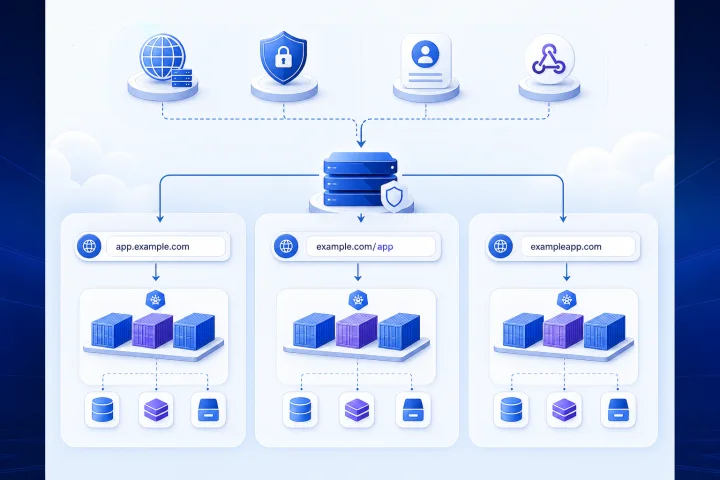
The three most common patterns are a dedicated subdomain such as https://app.example.com, a subdirectory behind an existing site such as https://example.com/app, and a separate domain such as https://exampleapp.com. The best choice depends on the application’s documented deployment model and on your operational requirements—not simply on which address looks shortest.
A key technical distinction is origin. A web origin is based on scheme, host, and port; the path is not part of the origin. As a result, https://example.com/app shares an origin with other content on https://example.com, while https://app.example.com uses a different host and therefore a different origin. That difference can matter for browser behavior, integration design, and isolation expectations.
- Choose the public URL before inviting users, connecting an identity provider, or publishing webhook endpoints.
- Treat the application’s canonical URL as configuration that must be recorded and maintained.
- Do not assume a reverse proxy can make every application work correctly below a path prefix.

The three patterns at a glance
A dedicated subdomain places the application at an address such as https://crm.example.com. For many self-hosted applications, this is the most straightforward public arrangement because the application can usually treat / as its base path. The reverse proxy routes by hostname, and generated links, static assets, and redirects do not need to include an additional public path prefix.
A subdirectory places the application below an existing hostname, for example https://example.com/analytics. This can create a unified public site and may be useful where a business must present one hostname. However, it introduces a requirement that both the reverse proxy and the application correctly understand the /analytics base path.
A separate domain places the application on a distinct name, such as https://example-portal.com. This can make product, client, business-unit, or governance boundaries clearer. It also creates a separate DNS, TLS, domain-ownership, and lifecycle surface to manage.
- Dedicated subdomain: usually the lower-complexity default for an application with its own login and integrations.
- Subdirectory: appropriate only after the application’s official documentation and a staging deployment confirm relative-URL support.
- Separate domain: useful when a clear public, administrative, or organizational boundary is more important than keeping the application under the primary brand domain.

Start with the application: verify documented base-URL and reverse-proxy support
Begin with the application’s own installation and reverse-proxy documentation. Look specifically for supported settings named base URL, external URL, site URL, root URL, relative URL, webroot, public URL, trusted proxy, forwarded headers, or a similar term. The terminology differs by product, and support is product-specific.
A proxy can remove a public prefix before forwarding a request. For example, a proxy can accept /app and forward the request to a backend that listens at /. Traefik’s StripPrefix middleware performs this kind of prefix removal and provides the removed prefix in X-Forwarded-Prefix. But stripping a path at the proxy does not automatically make the application aware that its public address includes that path.
The application must still generate public links, asset URLs, redirects, form targets, and callback URLs with the correct prefix. Official documentation can also reveal limitations. GitLab, for example, documents relative-URL installation as an alternative but recommends its own domain or subdomain in normal circumstances and describes limitations. This is a useful reminder not to generalize one product’s behavior to another.
- Read the vendor’s deployment documentation before selecting a subdirectory.
- Confirm whether the application supports a relative URL or webroot, not merely a generic reverse proxy.
- Identify required proxy headers and trusted-proxy settings.
- Record the exact canonical external URL in deployment documentation.
- Run a staging test using the intended public URL, not only a direct container or internal address.
Authentication and integrations: callback URLs, email links, embedded content, and webhooks
Authentication frequently makes a URL migration visible. OAuth integrations may require redirection endpoints to be registered with the authorization server. Where a full redirect URI is registered, OAuth 2.0 requires simple string comparison of the requested URI. A switch from https://example.com/app/callback to https://app.example.com/callback can therefore require a configuration change at the identity provider, even when the application itself is working.
Inventory every external service that stores or displays the public URL. This commonly includes single sign-on settings, password-reset and invitation emails, externally embedded pages, API client configuration, mobile or desktop clients, and webhook senders. An old value may not be noticed until a user follows a rare email flow or a background integration attempts delivery.
Webhooks deserve a separate validation step because their sender is an external HTTP client. The configured payload URL must be updated where necessary, and delivery should be tested after the new address is live. For services that validate TLS certificates, confirm that the endpoint serves the expected valid certificate and is publicly reachable on the required route.
- List every OAuth or SSO redirect URI before launch or migration.
- Send real test invitations, password resets, and notification emails to a controlled mailbox.
- Test embedded content from the site or product that will actually host it.
- Inventory inbound webhook senders, update their endpoint configuration, and trigger a test delivery.
- Check API clients and automation tools for hard-coded base URLs.
DNS, TLS certificates, and routing for each pattern
A hostname choice creates DNS and certificate work. Certificate authorities validate control of the domain names included in a certificate, so the selected hostname must resolve and route in a way that supports the chosen validation method. Let’s Encrypt HTTP-01 validation retrieves a challenge under /.well-known/acme-challenge/ on port 80. DNS and public routing are therefore part of application launch readiness, not a task to leave until after application configuration.
A subdomain normally needs a DNS record for that hostname and a certificate covering it. A separate domain requires the same work for a different domain name. A subdirectory does not add a hostname, but it does require precise path-routing rules and coexistence with the primary site’s routes, redirects, and challenge handling.
Wildcard certificates are a separate design choice. Let’s Encrypt documents that HTTP-01 cannot issue wildcard certificates; wildcard issuance requires DNS-01 validation. Do not choose a wildcard approach solely to avoid planning individual hostnames unless you can safely operate the required DNS validation process.
- Confirm DNS ownership and who can change the relevant records.
- Verify that the intended hostname resolves before certificate issuance and public launch.
- Check that port 80 and the ACME challenge route can be reached when using HTTP-01 validation.
- Define routing precedence so the main site, application routes, and challenge paths do not conflict.
- Where Docker is used, expose only the ports that need external access; a reverse proxy can reach services over the host or Docker network without publishing every container port publicly.
Data and governance: decide who owns the boundary
The domain structure should reflect operational ownership as well as user experience. Consider who controls domain registration, DNS records, certificate-related changes, application administration, billing contacts, and emergency access. A technically convenient URL can become an operational risk if it depends on a personal account or an unrelated team’s DNS access.
A separate domain can be useful when a client, acquired business, regulated unit, or standalone product needs a clearer public and administrative boundary. A dedicated subdomain can provide a practical boundary within a centrally managed parent domain. A subdirectory is often best reserved for cases where a shared hostname is genuinely required and the application’s support has been verified.
None of these choices automatically solves access governance. Define who administers the application, who holds DNS access, who approves integration changes, where backups are governed, and how access is transferred if personnel or suppliers change.
- Document the legal and operational owner of each domain and DNS zone.
- Avoid single-person control of registrar, DNS, and application administrator access.
- Assign owners for identity-provider settings, webhook configurations, and recovery procedures.
- Use a separate domain when an independent lifecycle or ownership boundary is a primary requirement.
Plan for migration: redirects help, but they do not update every dependency
A subdomain is often easier to change than a subdirectory deployment because the application can commonly remain rooted at /. That does not mean hostname changes are free of consequences. The new hostname changes the browser origin, may need a new certificate and DNS record, and can require updates to registered callbacks, webhook destinations, API clients, email templates, and allowlists.
A subdirectory-to-subdomain move may simplify future proxy configuration, but it still changes the canonical URL. GitLab’s documented migration guidance is a useful concrete example: changing the URL changes remote repository URLs, which users may need to update manually. Redirects can preserve browser-accessible legacy links, but they do not rewrite remote configuration held by every user or third-party system.
Test redirects according to the actual request types your application receives. HTTP redirects are client behavior, not a guarantee that all clients respond in the same way. HTTP semantics also distinguish method behavior: 301 and 302 may result in a POST becoming a GET, while 307 and 308 preserve the method. Do not assume that a browser-tested redirect proves an API client or webhook sender will behave correctly.
- Create an inventory of old URLs before changing the canonical address.
- Update application configuration, identity providers, webhook senders, API clients, documentation, and user-facing communications.
- Keep a deliberate redirect plan for browser traffic, including a retirement date and monitoring approach.
- Test POST-based workflows and external clients separately from ordinary GET navigation.
- Tell users when they must update saved remotes, bookmarks, client settings, or allowlists manually.
Frequently asked questions
Is a subdomain or subdirectory better for a self-hosted application?
A dedicated subdomain is usually the simpler default because the application can operate from /. Choose a subdirectory only when you need a shared hostname and the application’s official documentation plus a staging test confirm reliable relative-URL or webroot support.
Can a reverse proxy make any application work in a subdirectory?
No. A reverse proxy can strip a public path prefix before forwarding requests, but the application must still generate assets, redirects, links, and integrations using the public prefix. Proxy routing alone does not provide application-level base-URL support.
Do cookies make subdirectories unsafe?
Cookie Path limits when a browser sends a cookie, but it is not a security boundary. Applications under one hostname need deliberate cookie configuration and should not rely on path separation as protection between independently administered services.
What must change when moving an application to a new hostname?
Review the canonical application URL, DNS, TLS certificate, OAuth or SSO redirect URIs, password-reset and invitation links, webhook payload URLs, API clients, embedded content, documentation, allowlists, and user-configured clients. Redirects can help with browser links but do not automatically update external configurations.
How can Airbip help with URL routing for a managed application deployment?
Airbip deploys catalog applications as Docker workloads on Airbip cloud servers and automates routing and TLS certificates through Traefik and Let’s Encrypt. It also includes DNS checks, service lifecycle management, and configurable daily, weekly, and monthly backups. Customers can use an Airbip subdomain or a compatible custom domain. The customer still needs to choose the appropriate application URL, verify application-level base-URL support, configure identity and integrations, and make the relevant data, access, and governance decisions.
Sources and further reading
- Traefik StripPrefix middleware documentation — Traefik Labs
- GitLab: Install under a relative URL — GitLab
- GitLab: Migrate from a relative URL to a subdomain — GitLab
- Nextcloud Server Administration Manual — Nextcloud GmbH
- RFC 6265: HTTP State Management Mechanism — IETF
- RFC 6749: The OAuth 2.0 Authorization Framework — IETF
- RFC 6454: The Web Origin Concept — IETF
- RFC 9110: HTTP Semantics — IETF
- Challenge Types — Let’s Encrypt / Internet Security Research Group
- Docker networking overview — Docker