Where Should a Self-Hosted Application Store Its Files? A Decision Framework for Persistent Volumes and Object Storage
A database backup is often not enough to recover a self-hosted application. Use this framework to inventory uploads, attachments, exports, media and temporary data, then choose persistent volumes, object storage or another supported storage design with recovery and migration in mind.
File storage is an architectural decision
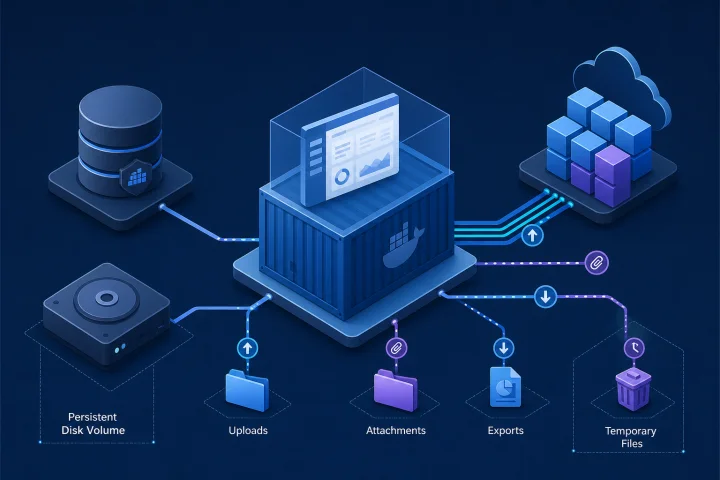
A self-hosted application commonly stores its durable state in more than one place. The database may hold records, permissions and metadata, while files such as uploads, documents, images and generated reports live on disk or in an object store. Restoring only the database can therefore produce records that point to files that no longer exist.
In Docker deployments, data written only to a container’s writable layer disappears when that container is destroyed. Durable application files must be placed in an explicitly persistent location that the application supports. The right choice is not automatically object storage: it is the storage pattern that matches the application’s file-access model, recovery requirements and team’s operating capacity.
- Treat every file location as part of the application’s data model.
- Design backups and restores around the database and the files it references.
- Document the intended storage location rather than relying on a container image or an undocumented host path.

Start with a file inventory
Before choosing storage, identify every category of data the application creates or consumes. Read the application’s official deployment and backup documentation, inspect configured paths and settings, and perform a test upload or export in a non-production environment. The objective is to learn what is authoritative, what can be regenerated and what must be preserved.
Do not assume that a directory called uploads is the whole answer. An application may keep original files, thumbnails, private attachments, plugin assets, search indexes, queued job payloads or export archives in different locations.
- User uploads and attachments: originals supplied by users or staff.
- Media and generated derivatives: images, previews, thumbnails or transformed documents.
- Generated exports: reports, CSV files, invoices or archive downloads.
- Application-managed assets: files created through an administrative interface.
- Caches, sessions and temporary work files: often disposable, but confirm this in vendor documentation.
- Logs and diagnostic files: operationally useful, but usually governed separately from application recovery.

Understand the three common storage patterns
Local persistent volumes store files outside the lifecycle of an individual container. Docker volumes are managed by Docker and remain when the container using them is removed. In Kubernetes, PersistentVolumes similarly have a lifecycle independent of an individual Pod. This pattern is often suitable for a single application instance whose software expects ordinary filesystem access.
Object storage stores data as objects in buckets, addressed by object keys. It is appropriate only when the application explicitly supports an object-storage service or provides a supported integration. For example, Rails Active Storage supports both a local disk service and cloud storage services, illustrating that storage choice is often an application configuration decision rather than a transparent infrastructure swap.
An externally managed file system can present shared filesystem access to workloads. It can be appropriate when the application genuinely requires it and the selected storage implementation supports the required access pattern. It adds another system to operate, secure, back up and test.
- Persistent volume: simple filesystem semantics for a supported single-host or single-node design.
- Object storage: application-aware object access, potentially separated from the compute host.
- Managed file system: shared filesystem semantics where justified by application requirements.
Use a decision matrix instead of a default
Choose storage per file category, not necessarily once for the whole application. A document-management workload may need durable attachment storage, while its temporary conversion directory should remain non-persistent. A reporting application may retain source documents but regenerate exports after a restore.
A storage design is defensible when it has clear answers for durability, application compatibility, recovery, portability, access control and routine maintenance.
- Durability: What happens if the container, host or node is replaced?
- Compatibility: Does the application officially support this storage backend and its configuration?
- Restore complexity: Can the team restore files and database data to a known compatible point?
- Migration portability: Can data be exported, copied and validated without undocumented assumptions?
- Access boundaries: Which service identity can read, write or delete the files?
- Operational overhead: Who owns credentials, capacity monitoring, retention rules and restore testing?
- Scaling model: Will more than one application process need to write the same files, and is that supported?
When local persistent volumes are the right answer
A local persistent volume is often the clearest choice for a small deployment when the application is designed for local filesystem storage, runs as one active instance, and the team can back up and restore the underlying volume. It avoids adding an object-storage integration solely because it sounds more scalable.
The simplicity is real only if the operational details are explicit. A Docker volume is host-managed, and a local volume name is unique to its host. Moving the application to another host requires a deliberate data transfer and verification process. Docker documents a method to archive volume contents through a temporary container and restore that archive into a volume, which can support a controlled migration or recovery workflow.
- Mount the durable volume at the application’s documented data path.
- Do not mistake a container filesystem path for persistent storage.
- Record the volume name, mount destination, ownership expectations and backup method.
- Check mount behavior during deployment: mounting a non-empty volume hides pre-existing image files at that destination; an empty volume may be populated from the image directory unless copying is disabled.
- Keep temporary data separate where possible; a tmpfs mount is suitable only for data intended to disappear on stop, restart or host reboot.
When object storage is suitable
Object storage is a strong option when an application natively supports it and the workload benefits from separating file objects from the application host. Do not infer compatibility from the fact that an application runs in Docker. Confirm the supported backend, required credentials, bucket layout, object naming behavior, URL delivery settings and any migration procedure in the application’s own documentation.
Object storage changes the operational model rather than eliminating it. You must still decide who can access the bucket, how accidental deletion is handled, how retained versions affect recovery, and whether lifecycle rules match the organisation’s retention obligations. In Amazon S3, for example, versioned and unversioned buckets have different delete behavior, and lifecycle rules can transition or delete objects.
- Use a dedicated bucket or clearly isolated prefix where the application’s design supports it.
- Grant the application only the permissions it needs; keep service credentials separate from human administration.
- Document how originals, derivatives and abandoned uploads are retained or removed.
- Test recovery using the same bucket configuration and access model expected in production.
- Make sure a lifecycle policy cannot delete data that the application or its users still need.
Frequently asked questions
Is a database backup enough for a self-hosted application?
Only if the application stores all recoverable data in the database and no required files exist elsewhere. Many applications store attachment metadata in the database but keep the actual files in a volume or object store. Inventory and back up both parts.
Should every self-hosted application use object storage?
No. Use object storage when the application explicitly supports it and its recovery, access and operational model fit your needs. A persistent local volume can be the simpler and more appropriate design for a supported single-instance application.
Are Docker volumes backed up automatically?
A Docker volume persists separately from a container, but persistence is not the same as backup. You need a documented backup method, retention policy and tested restore process for the volume’s contents.
Can several containers share a Docker local volume?
Do not assume so from a Compose configuration alone. Docker documents that services using the local volume driver do not automatically share data with other service containers. Design shared access explicitly and verify the application’s requirements.
What should be included in a recovery test?
Restore the database and file storage using the intended procedure, then verify user login where relevant, recent and older attachments, downloads, permissions, generated content and the application’s ability to create a new file after recovery.
Does managed application hosting remove file-storage responsibility?
No. Managed deployment can reduce infrastructure work, but the customer still needs to understand what business data exists, who can access it, what retention is appropriate and whether the application’s recovery design meets its needs. Airbip deploys catalog applications as Docker workloads on cloud servers and offers configurable daily, weekly and monthly backups; confirm the storage and recovery scope for the specific application before relying on any backup plan.
Sources and further reading
- Docker volumes — Docker
- Docker storage — Docker
- Persistent Volumes — Kubernetes
- Storage Classes — Kubernetes
- Amazon S3 objects overview — Amazon Web Services
- What is Amazon S3? — Amazon Web Services
- Deleting Amazon S3 objects — Amazon Web Services
- Managing the lifecycle of objects — Amazon Web Services
- Access control in Amazon S3 — Amazon Web Services
- Active Storage Overview — Ruby on Rails