Changing the Domain of a Self-Hosted Application: A Dependency Checklist Before You Move
Changing a self-hosted application’s domain affects more than DNS and a reverse proxy. Use this dependency inventory, cutover plan and test script to update application settings, identity callbacks, integrations, generated links and redirects safely.
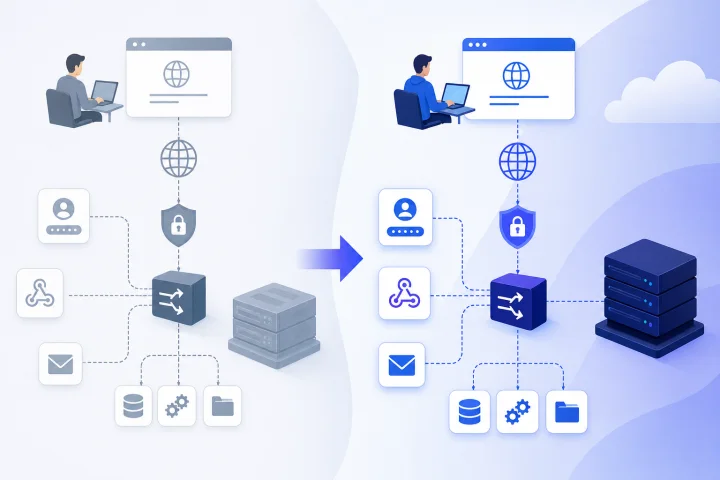
Why a domain change is an application change, not only a DNS change
To change domain for a self-hosted application safely, treat the public URL as application configuration rather than a simple routing detail. DNS determines where a hostname resolves, and a reverse proxy determines which service receives a request. Neither automatically changes the URLs the application generates, the callback addresses registered with external services, or the links people already use.
The domain may be present in environment variables, application administration settings, database records, identity-provider configuration, webhook subscriptions, API client configuration and email templates. It can also be implicit in browser security controls: a change in host creates a different web origin, because an origin is defined by scheme, host and port.[1] A browser-based integration that worked at the old hostname may therefore require an explicit allowed-origin update.
Separate the work into two tracks. Infrastructure owners handle DNS records, TLS validation, reverse-proxy routing and old-domain redirects. Application owners identify canonical URL settings, connected services, user-facing links and business workflows. Both tracks need to be complete before the old domain is retired.
- Do not assume a successful DNS lookup proves the migration is complete.
- Do not assume a reverse-proxy hostname rule updates an application's internal base URL.
- Do not remove the old hostname until redirects, integrations and user journeys have been tested.
- Assign named owners for infrastructure, application configuration, identity integrations and acceptance testing.

Map the canonical URL and every hostname in use
Start with a hostname inventory. The goal is to find every address the application accepts, publishes or depends on. Include the current canonical public URL, the intended new canonical URL, any www or non-www alternative, administrative hostnames, API hostnames, upload or asset hostnames, and subdomains used by embedded services.
For each hostname, record its purpose, current DNS target, intended DNS target, TLS certificate requirement, reverse-proxy route, owning team and retirement decision. A wildcard route or certificate should not be treated as proof that every hostname works. For example, a single-level wildcard such as *.example.com does not cover the apex domain example.com or a multi-level name such as api.eu.example.com.[2]
Then determine which URL the application considers canonical. This is the address it uses when generating absolute links, redirects, API URLs, asset URLs or notifications. If the canonical URL remains old.example.com while users access new.example.com, the interface may appear functional until an email, a login flow or an API response sends a user back to the old domain.
- List production, staging and administrative hostnames separately.
- Record both scheme and port where they are relevant: http and https are not interchangeable origins.
- Search application settings, deployment files, secrets stores and documentation for the old hostname.
- Check browser bookmarks, internal wiki links, public documentation and embedded links that may need an owner and update date.
- Decide whether each old hostname will redirect, remain supported temporarily or be retired.

Find dependencies that commonly break after a hostname change
Identity and integration settings are frequent failure points because they intentionally bind a client or endpoint to a precise address. OAuth redirect URIs deserve early attention: current OAuth security guidance requires authorization servers to use exact string matching for pre-registered redirect URIs, apart from a limited localhost case for native apps.[3] Adding a new domain at the identity provider is therefore a required pre-cutover task, not a post-change convenience.
Review both inbound and outbound connections. Inbound dependencies include identity-provider callbacks, payment or form callbacks, and third-party webhooks targeting the application. Outbound dependencies include webhooks delivered by the application to another service, API clients that call the old hostname, and embedded widgets or scripts that load resources from the old host.
CORS is another common boundary. If an API or proxy uses an explicit allowed-origin list, add the new scheme-and-host origin before cutover.[4] Do not broaden origin rules casually just to make a test pass; preserve the intended access boundary and make the smallest justified change.
Generated communications need the same review. Password-reset messages, invitations, comment notifications, exports, scheduled reports and marketing or transactional templates may include absolute links. Test with a non-privileged mailbox as well as with an administrator account, since template paths and permissions can differ.
- OAuth and OpenID Connect redirect and logout URLs.
- SAML assertion consumer URLs and entity or metadata references, where used.
- Webhook destinations and webhook sender allowlists.
- API base URLs in scripts, mobile clients, browser extensions and internal tools.
- CORS allowed-origin lists, browser-based embeds and iframe settings.
- Email templates, password resets, invitations, calendar links and notification links.
- Hard-coded URLs in automation workflows, scheduled jobs and documentation.
Check application-specific configuration, including the configuration that actually reaches the container
Every application names these settings differently, but look for concepts such as base URL, public URL, site URL, external URL, canonical URL, trusted hosts, allowed hosts, allowed origins, proxy mode and forwarded-header trust. Consult the application vendor’s documentation for the exact setting names and restart requirements. Do not infer that a setting is optional because the application starts without it.
For Docker-based deployments, review the effective runtime configuration rather than relying on one file or one remembered value. Docker Compose can supply configuration through container environment variables, and values from a .env file can be interpolated into a Compose file. Environment-variable precedence can alter the value that reaches a container.[5] When appropriate for your deployment, docker compose config is a useful way to confirm the resolved Compose configuration, especially when multiple Compose files or variable sources are involved.[6]
Also inspect settings stored outside the Compose definition: application administration panels, database-backed configuration, mounted configuration files, secrets management systems and startup scripts. Make a before-and-after record for each changed value. This record makes peer review and rollback much faster.
If the application sits behind a reverse proxy, confirm its expectations for the original host and protocol. A proxy can forward this information upstream, but trust in forwarded headers must be configured deliberately.[7] Incorrect handling can lead to generated http links, redirect loops or a mismatch between the public hostname and the hostname the application believes it serves.
- Canonical or external URL matches the planned HTTPS hostname.
- Trusted or allowed host list includes the new hostname and, during transition, the old hostname if it remains served.
- CORS and CSRF-related origin settings include only required origins.
- Proxy and forwarded-protocol settings match the actual proxy design.
- OAuth, SSO, webhook and SMTP-related settings are checked in both the application and the external provider.
- Resolved container configuration is reviewed before restart or redeploy.
- A secure copy of prior settings is available for rollback.
Plan DNS, TLS and reverse-proxy work without confusing it with application configuration
Infrastructure changes should be planned as their own controlled sequence. Create the new DNS records, ensure the reverse proxy has a route that matches the new hostname, and verify the correct backend service is selected. In Traefik, HTTP routers use request-matching rules such as Host rules to connect requests to services.[2] Overlapping rules need extra care: default rule ordering can be affected by rule length, so a broad rule can capture traffic unless priorities are designed explicitly.[2]
Provision and validate TLS before declaring the new domain ready. Certificate issuance requires domain-control validation. With the HTTP-01 ACME challenge, the validation token must be reachable at the new hostname under /.well-known/acme-challenge/ on port 80.[8] Check firewall, DNS, proxy routing and any redirect behavior that could prevent validation.
Airbip customers can use an Airbip subdomain or a compatible custom domain. Airbip manages application instances as Docker workloads on Airbip cloud servers and automates routing and TLS certificates through Traefik and Let’s Encrypt, with DNS checks included in the service. That infrastructure support does not replace the application-owner review of base URLs, identity registrations, webhooks, templates and business workflows.
Use a DNS change window that allows observation, not merely a quick switch. Confirm the new hostname from an external network, inspect the certificate and test the intended route. Keep the old path available until the application and integration checks provide evidence that it is safe to retire.
- Create and verify DNS for every new hostname, including the apex name when needed.
- Confirm that the new hostname has an explicit, unambiguous reverse-proxy route.
- Confirm TLS issuance and the certificate name presented to clients.
- Check HTTPS redirects and avoid routing the ACME validation path away from the required challenge response.
- Test proxy-to-application behavior for the expected host and HTTPS protocol.
- Document the prior DNS and proxy configuration before making irreversible changes.
Choose a cutover approach: validate in parallel, redirect deliberately and retain the old domain for a defined period
The lowest-risk approach is usually to establish the new hostname before making it canonical. Route it to the application, obtain TLS, and complete controlled tests while the old domain remains available. Whether both hostnames can be served safely at the same time depends on the application’s host validation, session behavior, generated-link behavior and licensing or integration constraints. Validate this with the application’s documentation and in a controlled environment where possible.
Once the new hostname is accepted as canonical, redirect old public URLs to their corresponding new URLs when preserving paths is appropriate. HTTP 308 is a permanent redirect status that uses a Location header and preserves the request method.[9] That property can matter for non-GET requests, but it is not a blanket instruction to redirect every endpoint. For APIs, webhooks, signed URLs, upload paths and machine clients, determine whether a redirect is supported and safe before enabling it.
Set an explicit legacy-domain period rather than leaving both domains indefinitely by accident. During that period, monitor access to the old host, correct remaining hard-coded links, and notify affected users or integration owners. Retaining a domain has operational and governance implications, so the decision should be intentional and reviewed.
- Phase 1: Add the new domain, route it, issue TLS and test it without changing canonical application settings where parallel access is safe.
- Phase 2: Update canonical URL and application dependencies, then test critical workflows on the new hostname.
- Phase 3: Redirect suitable old-domain browser traffic while separately validating API and webhook behavior.
- Phase 4: Observe old-domain use, remediate remaining dependencies and approve retirement against defined criteria.
- Avoid assuming that a redirect preserves signed requests, callback validation or third-party client behavior.
Run a post-change test script that reflects real work
A home-page check is necessary but insufficient. Use a written test script with expected outcomes, actual outcomes, timestamps and a named tester. Run it from an ordinary user account and an administrator account, and test from a clean browser session to avoid relying on cached sessions or permissions.
Prioritize the workflows that create external links, cross identity boundaries or write important data. Capture evidence such as screenshots of the browser address, received email links, webhook delivery records and relevant application or proxy logs. Evidence is more useful than a verbal confirmation when deciding whether to maintain a redirect or retire the legacy domain.
If a test fails, classify it before changing configuration: DNS resolution, certificate, proxy route, application canonical URL, browser origin policy, external integration registration, or client-side hard-coded URL. This prevents a common response pattern of weakening security controls or applying broad redirects to mask an ownership or configuration gap.
- Open the new URL in a clean browser session and confirm HTTPS, expected hostname and normal application access.
- Sign in through every supported local, OAuth, SSO or administrator authentication path.
- Complete password reset, invitation and account-verification flows; inspect the hostname in received email links.
- Create content or records that generate links, then open those links in a new session.
- Test file upload, download, previews and externally stored or embedded content where applicable.
- Exercise API clients, browser integrations and cross-origin frontend requests that use the service.
- Trigger inbound and outbound webhooks and confirm the expected endpoint, signature handling and response behavior.
- Perform key administrative workflows, including user management and configuration changes appropriate to the application role modeling process. Use care not to expose secrets in test evidence or logs during this process.
Define ownership, rollback conditions and retirement evidence before the change window
A domain move is easier to govern when the decision points are set before any records or settings change. Name a technical change owner, an application owner, an identity and integrations owner, a communications owner and an approver for retiring the old domain. In a small team, one person may hold several roles, but the responsibilities should still be explicit.
Define rollback in operational terms. For example, rollback may mean restoring the prior canonical URL, re-enabling the previous proxy route, restoring the prior DNS target, or suspending a redirect while an external identity registration is corrected. Identify which changes are reversible quickly and which require propagation or third-party action. Keep a secure record of previous values and the order in which they must be restored.
Finally, require evidence before retirement. Suitable evidence includes successful tests of critical journeys on the new hostname, confirmed OAuth or SSO callbacks, verified email links, successful webhook tests, no unresolved old-domain traffic requiring action during the agreed observation period, and approval from the owners of high-impact integrations. Retirement is a business and governance decision as well as a technical one; it should account for user communications, retained bookmarks and any contractual or regulatory requirements your organisation has.
A managed platform can reduce the operational burden around routing, certificates, DNS checks, service lifecycle management and backups. It cannot decide which identity providers, client applications, links or data-handling commitments matter to your organisation. Keep that application-level accountability with the people who own the service.
- Publish a change record with planned hostname, time window, owners, dependencies and customer or user communication plan.
- Record prior DNS, proxy and application configuration securely.
- Set measurable rollback triggers, such as failed sign-in, broken password reset, failed critical webhook or incorrect canonical links.
- Decide who can authorize rollback and how affected users will be informed.
- Set legacy-domain retirement criteria and an observation period.
- Archive test evidence and the final configuration inventory after completion.
Frequently asked questions
Will changing DNS automatically update my self-hosted application’s URL?
No. DNS directs a hostname to infrastructure, but applications can store or generate their own public URL. Review canonical or base URL settings, trusted hosts, origin rules, identity callbacks, webhooks and email templates separately.
Why can OAuth or SSO fail after I move to a new domain?
Identity providers commonly require registered callback URLs. OAuth guidance requires exact string matching for pre-registered redirect URIs, so the new callback address generally needs to be added and tested before cutover.
Can I keep the old and new domains active at the same time?
Often, temporarily, but confirm that the application supports both hostnames safely. Check host validation, sessions, generated links, cookie behavior, identity callback registrations and integration expectations before operating in parallel.
Should I redirect every old URL to the new domain?
Redirect suitable browser-facing pages after testing. Review APIs, webhooks, signed URLs, file uploads and machine clients individually because redirects may not be expected or safe for those request types.
What should I test first after changing an application domain?
Test HTTPS access on the new hostname, each sign-in method, password reset and invitation emails, generated links, critical API clients, inbound and outbound webhooks, file workflows and administrative tasks. Use clean browser sessions and record the results.
What does Airbip handle during a custom-domain change?
For compatible custom domains, Airbip provides managed application deployment and automates routing and TLS certificates through Traefik and Let’s Encrypt, with DNS checks. Customers still need to own or coordinate application-specific URL settings, access configuration, integrations, user communications and governance decisions.
Sources and further reading
- Docker Compose environment variables — Docker
- Docker Compose variable interpolation — Docker
- Docker Compose Quickstart — Docker
- Traefik HTTP router rules — Traefik Labs
- Traefik headers middleware — Traefik Labs
- Traefik entry points and forwarded headers — Traefik Labs
- Let’s Encrypt challenge types — Internet Security Research Group
- OAuth 2.0 Security Best Current Practice — IETF
- The Web Origin Concept — IETF
- HTTP Semantics — IETF