Does Your Self-Hosted Application Need Background Workers? A Practical Decision Framework
Background workers keep long-running and scheduled tasks out of the interactive request path. Use this framework to decide whether your self-hosted application needs workers, what dependencies to verify, and when a single-server design is still the sensible choice.
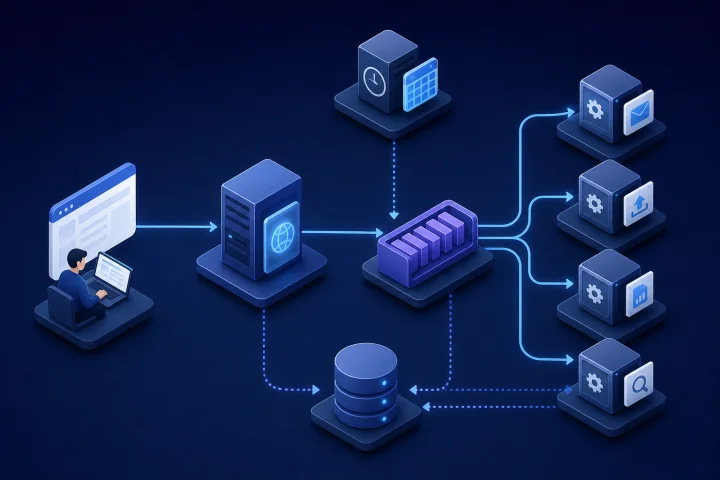
Background workers protect the interactive experience
A web request is the work that happens while a person waits: opening a dashboard, submitting a form, saving a record or viewing a page. The request should return a useful result promptly. A background worker is a separate process that takes on work which can continue after that response has been sent.
This distinction matters when an action triggers work with unpredictable or extended duration. Sending a message batch, parsing an uploaded file, generating a report or processing media can consume time and resources well beyond the user interaction that started it. Laravel’s queue documentation uses CSV parsing and storage as an example of work that can take too long in a normal web request and should instead be processed in the background.
Do not treat workers as an automatic mark of a mature deployment. They add moving parts, operational dependencies and failure modes. The right question is not “does this application have a queue?” but “does this application’s required work fit safely inside the request path, or does it need independent execution and supervision?”
- Keep the web process focused on interactive traffic.
- Move work to the background when a user does not need the final result before continuing.
- Use the application’s own documentation as the authority on whether workers, a scheduler or a queue backend are required.
- Do not assume that every self-hosted application supports the same worker architecture.

Which workloads commonly belong in the background?
Framework documentation consistently identifies email delivery, data processing and recurring maintenance as background-job use cases. In practical self-hosted deployments, the same pattern appears in many business, publishing, analytics and automation workflows.
The deciding factor is not the feature name. It is whether the work can be accepted now and completed later without making the user wait, provided the application gives users an appropriate status, notification or result when it finishes.
- Imports and exports: parsing data, validating records, transforming files and producing downloadable output.
- Notifications: email delivery, digest generation and other non-immediate communication.
- Scheduled jobs: regular clean-up, billing-related maintenance, backups initiated by the application, or periodic refresh activity.
- Reporting: compiling data-intensive reports or generating recurring reports.
- Media processing: creating thumbnails, conversions or other file transformations where the application supports it.
- Indexing and search-related processing: updating derived indexes after content or records change.
- Automation: processing work triggered by forms, integrations or workflow events.

Use a five-part model before discussing server size
A worker deployment is easier to reason about when its responsibilities are separated. The exact names vary by application, but five roles recur: the web process, scheduler, queue, worker and persistent data store.
The web process receives browser or API traffic. It may create a task and place a reference to it in a queue. The queue holds pending work. One or more workers consume tasks and execute them. A scheduler creates work at defined times, while persistent storage holds the application data and, depending on the design, may also hold queue or job information.
Scheduled work and queue consumption are different. A scheduler creates work at intervals; a worker continuously takes available work from a queue. Kubernetes documentation describes scheduled Jobs as useful for actions such as backups and report generation, while also cautioning that scheduling should not be assumed to provide exactly-once execution. Your application’s own scheduler has its own semantics, so verify what it guarantees and design recurring work accordingly.
Docker Compose can define multiple services from one configuration, and Docker recommends separating concerns rather than putting every responsibility into a single container. That makes it possible to operate web, worker, queue and database components independently when the application actually calls for them.
- Web process: serves interactive requests.
- Scheduler: triggers work on a recurring timetable.
- Queue: stores pending tasks or task references until they are handled.
- Worker: executes queued tasks outside the request path.
- Persistent data store: retains application data and may retain queue, job or state information.
Five signals that background work is already affecting users
The need for workers usually becomes visible through symptoms rather than an abstract architecture discussion. Look for patterns over normal and peak periods, not one isolated slow action.
Start with request duration. If long user-facing requests coincide with imports, reports, batch notifications or other expensive actions, work in the request path may be competing with interactive traffic. Where Traefik access logs are available, their duration field includes total response-processing time, including origin-server time, making them a useful source of request-duration evidence.
Then look at the task lifecycle itself. A task may be accepted but delayed, repeatedly fail, disappear without clear visibility, or compete with the web process for available compute and memory. Queue growth is particularly important: Laravel notes that a sudden influx can overwhelm a queue and create a long completion wait.
- Slow requests: users wait noticeably longer when intensive actions run.
- Delayed outcomes: emails, imports, reports or other results arrive later than expected after being requested.
- Failed scheduled work: recurring maintenance or reports do not run reliably, or duplicate handling is possible and not controlled.
- Queue growth: pending work rises and does not return to a normal level after a peak.
- Resource contention: long tasks impair the responsiveness of the web application or other required services.
Answer these dependency questions before adding a worker
A worker is not merely another process to start. It must use the application’s supported command, configuration, queue backend and lifecycle model. Begin with the official documentation for the exact application release you operate. Confirm whether background processing is optional, recommended for particular functions, or required for core functions.
Next, identify the queue backend. Queue implementations vary. For example, Laravel documents connections using relational databases and Redis as well as other backends. The presence of a database does not mean it is automatically the correct queue choice; use the backend, credentials, persistence and operational model that the application supports.
Dependency readiness is another frequent source of deployment failures. Starting a database or queue container before a worker does not itself prove that the dependency is ready to accept work. Docker Compose supports healthcheck-based dependency conditions, but the configuration must explicitly use them. Test restarts, not only first boot.
Finally, establish how operators will know a job has failed. Application logs alone may be insufficient. Celery’s monitoring guidance, for example, distinguishes events such as received, started, succeeded, failed and retried. Whether or not your application provides those exact events, define the equivalent evidence you need before relying on workers for important business activity.
- What official worker and scheduler commands does the application support?
- Is a queue required, and which backends and versions does the application support?
- Where are job payloads, results, failure records and uploaded files persisted?
- Does the worker wait for a healthy queue and database, rather than only a started container?
- How are workers restarted after a timeout, crash, deployment or server reboot?
- Where can an operator see pending, running, retried and failed work?
- Who can access queue credentials, worker logs and failed-job data?
Design for retries, duplicates and partial failure
Retries are necessary for many transient failures, but they can turn a small fault into repeated damage if task behavior is not understood. Celery advises that task functions should ideally be idempotent because a message can be redelivered after worker failure. In plain terms, running the same task twice should not create an unacceptable duplicate outcome.
Ask concrete questions. If a worker crashes after sending an email but before recording completion, what happens on redelivery? If an import is retried, are records duplicated? If a payment-related or external action is involved, is there an application-level idempotency key or another safe guard? The answers determine whether automatic retries are appropriate.
Acknowledgement timing also changes the failure model. Different queue systems can acknowledge a message before or after execution, and the implications must be checked in the relevant application or framework documentation. Do not copy retry or acknowledgement settings from an unrelated application.
Use bounded recovery. Laravel documents controls such as maximum attempts, retry-until times, maximum unhandled exceptions and backoff delays. The principle generalises: set limits, add delays where appropriate, record failed work and give a person or a documented procedure a path to inspect and resolve it.
- Confirm whether tasks are safe to repeat.
- Set a maximum attempt count and a deliberate retry delay or backoff where supported.
- Prevent repeated retries from creating duplicate emails, records, files or external actions.
- Retain enough job context to investigate a failure without exposing unnecessary sensitive data.
- Define when failed tasks are retried manually, corrected, discarded or escalated.
Estimate capacity from work, not a single server metric
CPU and memory readings matter, but they do not answer the capacity question alone. A useful starting model combines four observations: how many tasks arrive, how long they take, how many can run concurrently and when the peaks occur.
If tasks arrive faster than workers can complete them over a sustained period, the backlog grows. If work arrives in short spikes, a system may be adequate on average but still leave users waiting after a campaign, import or scheduled reporting period. Measure ordinary workload separately from the largest expected burst.
Concurrency is a capacity lever, not a universal remedy. More concurrent workers may reduce a backlog, but they also increase simultaneous demand on the queue, database, external services and the server. A task that is constrained by database work, a remote API or large files may not improve proportionally with additional worker processes.
Begin conservatively, establish normal queue depth and completion time, then test a representative peak. Change one variable at a time: task batching, concurrency, schedule timing or worker allocation. Keep interactive response times in the assessment; a worker design is not successful if it clears the queue by degrading the web application.
- Arrival rate: how many jobs are created in a minute, hour or day?
- Task duration: how long does each task take at typical and peak data sizes?
- Concurrency: how many tasks can safely execute in parallel?
- Peak periods: when do campaigns, imports, reports or scheduled work create bursts?
- Completion expectation: how quickly does the business need the result after a task is submitted?
- Shared dependencies: will additional workers overload the database, queue, storage or external service?
Put operational safeguards around worker services
Workers deserve their own operational visibility because their failure may be less obvious than a web outage. Separate worker and scheduler logs from web-request logs where the deployment model allows it. This helps distinguish a user-facing error from a task-processing fault and makes it easier to follow a job across its lifecycle.
Alerting should reflect business consequences. Monitor failed jobs, queue growth, unusually old pending work and worker availability. Laravel notes that production workers can stop after events such as timeouts and recommends process monitoring or an equivalent mechanism to detect exits and restart workers. The exact supervision mechanism depends on the deployment, but an unsupervised worker is a predictable weak point.
Backups require the same care as any other application data. Determine where job-related state is stored: the application database, a queue backend, a Docker volume, file storage or more than one of these. Docker documents volumes as suitable for backup, restore and migration workflows, but backup coverage should be verified against the actual data path. A backup plan that omits critical job or uploaded-file data may not support a meaningful restore.
Access controls are also part of reliability. Queue credentials, logs and failed-job payloads can contain operational or sensitive information. Limit access, document ownership and ensure that data retention matches your governance needs.
- Keep web, worker and scheduler logs distinguishable.
- Alert on worker exits, failed jobs, abnormal queue depth and excessive pending-job age.
- Use bounded retries and retain failed-task evidence for investigation.
- Verify backup and restore coverage for databases, volumes, uploaded files and job-related state.
- Restrict access to task data, queue credentials and operational logs.
- Test a restart and a restore procedure rather than assuming the configuration is sufficient.
Frequently asked questions
Does every self-hosted application need background workers?
No. A simple application with short requests, low-volume tasks and no required asynchronous or scheduled functions may work well with a single application process. Add workers when the application documents them as required or when long-running, scheduled or bursty work is harming responsiveness or reliability.
What is the difference between a scheduler and a background worker?
A scheduler creates or triggers work at chosen times. A worker consumes and executes queued work. Some applications use both; others use one or neither. Check the application’s official documentation rather than assuming a standard architecture.
Can a database be used as a queue backend?
Some applications support relational databases as a queue backend; Laravel is one documented example. Whether it is appropriate depends on what the specific application supports and on the operational demands of its workload. Confirm persistence, backup, monitoring and performance implications for that implementation.
Why can a task run twice?
A worker can fail after doing some or all of the work, while the queue may later redeliver the message depending on its acknowledgement behavior. That is why tasks should ideally be idempotent: repeated execution should not cause an unacceptable duplicate outcome.
How do I know whether a worker backlog is a problem?
Watch whether pending work rises during a peak and returns to a normal level within the completion time your business requires. A queue that continues growing, or leaves tasks pending longer than users and operations can accept, needs investigation.
Can Airbip host an application that uses worker services?
Airbip manages deployment of applications from its public catalog as Docker workloads on Airbip cloud servers, with routing and TLS handled through Traefik and Let’s Encrypt, plus service lifecycle management and configurable daily, weekly and monthly backups. Worker and scheduler requirements are application-specific, so confirm the application’s documented architecture and the available deployment model before choosing a plan or configuration. Review current plans and commercial terms on the live Airbip website.
Sources and further reading
- Laravel Queue Documentation — Laravel
- Active Job Basics — Ruby on Rails
- Tasks — Celery
- Monitoring and Management Guide — Celery
- CronJob — Kubernetes
- How Compose Works — Docker
- Control Startup and Shutdown Order in Compose — Docker
- Volumes — Docker
- Logs and Access Logs — Traefik Labs