How to Set a Database Connection Budget for a Self-Hosted Application
Estimate the connections your application could open, compare that capacity with your database limit, and validate the budget under realistic workloads.
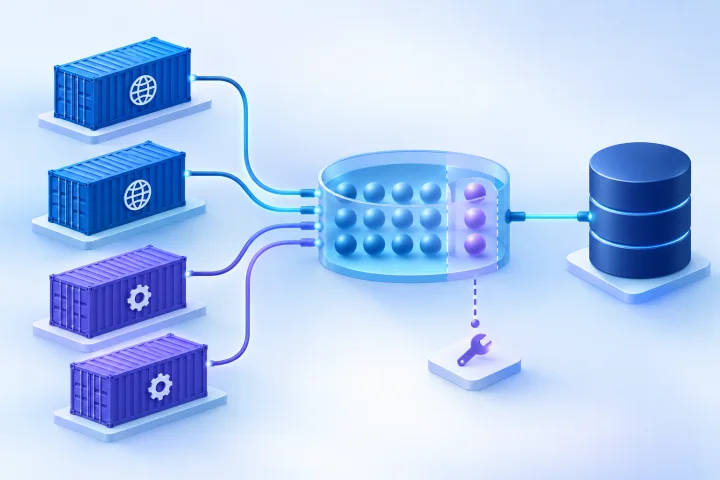
Why database connections need a budget
A database connection budget estimates how many simultaneous connections an application deployment may need, plus the capacity you want to keep available for maintenance and unexpected demand. It helps prevent connection exhaustion without treating the database limit as a target to fill.
Adding application containers can increase potential connections even when the code and traffic per container stay the same. Docker’s [Compose Deploy Specification](https://docs.docker.com/reference/compose-file/deploy/) defines replicas as the number of containers intended to run for a replicated service; if each replica has its own connection pools, each adds potential capacity.
Configured capacity is not the same as actual use: a pool may be able to open a certain number of connections without opening all of them at once. A connection that is idle between queries may still be open and count against the database limit. Managed infrastructure does not remove the need to understand the application’s pool behavior and database limit.
- Treat configured pool capacity as a ceiling the application may reach, not a prediction of its normal connection count.
- Observed open connections are a measurement at a point in time, not proof that all connections are actively running queries.
- Budget each database separately if application components connect to more than one database.

Inventory every source of connections
Start by listing every process or tool that can connect to the database. Don’t count only the web-facing application: background work and operational tasks can have their own connection pools or direct connections.
For each source, record how many instances can run at once, how many processes or pool instances each instance can create, and the pool’s configured capacity. Check deployment configuration and the application’s official documentation rather than assuming that a framework’s default applies to your version or setup.
- Web application containers, including the maximum replica count you may deploy.
- Worker containers and the number of worker processes or pool instances in each.
- Schedulers, recurring jobs, and other services that connect directly to the database.
- Migrations, deployment jobs, monitoring, reporting, backup-related tools, and administrative sessions.
- Temporary overlap during releases or recovery, if old and new instances may run at the same time.

Estimate potential demand without confusing it with actual use
For a first-pass estimate, calculate the maximum configured capacity of each connection-pool group, then add the groups that connect to the same database. A useful form is: potential pool capacity = number of running instances × pool instances per instance × maximum connections per pool. Add the capacity of separate workers and other services, then account for direct connections that do not use those pools.
Use the actual number of pool instances, not an assumed number of application containers. For example, an application might create one pool per process, so multiple web processes in each container multiply the container-level capacity. If an engine or pool is shared by processes, follow the application’s documented behavior rather than multiplying it twice.
Here is a hypothetical calculation, not a recommended configuration: three replicas, each with four processes and a maximum pool size of five per process, have a potential web-pool capacity of 60 connections. If a separate worker service has two replicas with a pool capacity of four each, add eight, for a combined potential of 68 before migrations, monitoring, or administrative access.
That total is a configured ceiling under the stated assumptions, not a prediction of ordinary use. Measure actual counts under load as well as calculating the ceiling.
- Write down each input and where it came from: replicas, processes per instance, pool instances, and per-pool limits.
- Use the highest instance count your deployment can reach during normal scaling or a release, not just the count running today.
- Do not add capacities for components that target different database servers to a single database total.
- For SQLAlchemy’s documented QueuePool cases, the maximum connections in play for an Engine is pool_size plus max_overflow. Confirm that this pool and those settings apply to your application before using that calculation; see [SQLAlchemy’s pool-limit documentation](https://docs.sqlalchemy.org/en/20/errors.html).
Compare the estimate with the database limit
Compare the sum of potential application demand with the database’s documented concurrent-connection limit. Do not plan to consume every available slot. Keep room for maintenance, migrations, monitoring, administrative diagnosis, and short-lived increases in demand. Choose that reserve based on your own operational needs and observed peaks; there is no universal safe percentage.
Account for how the database defines usable slots. [PostgreSQL’s connection and authentication documentation](https://www.postgresql.org/docs/17/runtime-config-connection.html) describes max_connections as the maximum number of concurrent connections and notes that increasing it also raises allocation of certain resources, including shared memory. PostgreSQL can reserve slots for appropriately privileged roles, so not every slot is necessarily available to ordinary application connections.
[MySQL’s connection documentation](https://dev.mysql.com/doc/refman/8.0/en/connection-interfaces.html) describes max_connections as the maximum number of simultaneous clients permitted. It also documents an extra connection for an account with CONNECTION_ADMIN, or the deprecated SUPER privilege, for diagnosis. Treat that as an administrative provision described by MySQL, not as ordinary application capacity.
If the estimate approaches or exceeds the usable limit, first review replica counts, process counts, pool sizes, and unnecessary connection sources. Raising the database limit is not automatically the right fix: it may consume more resources, and it does not correct an oversized pool or a connection leak.
- Record the configured database limit and any reserved or privileged slots relevant to your database.
- Subtract the operational reserve before deciding how much capacity remains for application pools.
- Check the database vendor’s documentation for the database and configuration you actually run.
- If you change the limit, assess the database resource implications and validate the new setting rather than assuming a higher number is harmless.
Check how pooling works at both layers
An application pool and a database connection limit control different things. The application pool controls how many connections a pool can create and what happens when all of them are busy. The database limit controls how many clients the database accepts concurrently. A pool that permits more connections than the database can serve can shift failure from the application to the database.
For SQLAlchemy’s documented QueuePool cases, additional requests wait when the configured capacity is occupied and can time out. The [SQLAlchemy documentation](https://docs.sqlalchemy.org/en/20/errors.html) also warns that unlimited overflow can allow demand to reach the database’s own connection limit. Treat pool timeouts as evidence to investigate demand and pool behavior, not as an automatic instruction to enlarge the pool.
If PgBouncer is part of the design, distinguish client connections from server connections. Its [configuration documentation](https://www.pgbouncer.org/config) describes separate client and server limits per database; the difference can represent clients queued while waiting for active server connections. Pool mode also affects when a server connection becomes reusable: in session mode after the client disconnects, and in transaction mode after a transaction finishes. Verify the configured mode and application compatibility in the documentation.
Do not assume pooling happens just because the application or deployment uses containers. Identify which component owns each pool, whether the pool is per process, and whether a proxy sits between the application and database.
- Read the application or framework’s official pool documentation for the deployed configuration.
- Confirm the meaning of pool size, overflow, idle lifetime, and timeout settings where those options exist.
- If using a database proxy, budget its client-side and database-side connections separately.
- Verify what happens to a connection after a request, job, or transaction ends.
Validate the budget under representative concurrency
A paper estimate is a starting point. Exercise the application with representative concurrent requests and background jobs, including the workload patterns that matter to your team. Observe connection counts alongside application queueing and errors, then compare the peak with the estimate and the reserved capacity.
For PostgreSQL, [pg_stat_activity](https://www.postgresql.org/docs/16/monitoring-stats.html) provides one row per server process and includes fields such as application_name, user, client address, state, and current query. Those fields can help identify connection sources and distinguish observed activity. Use database-appropriate monitoring for other engines; MySQL documents Connection_errors_max_connections as a counter that increments when a connection is refused because max_connections has been reached in its [connection documentation](https://dev.mysql.com/doc/refman/8.0/en/connection-interfaces.html).
Test more than the normal web path. Include a deployment or migration scenario if it can overlap with live traffic, and include worker activity if workers share the database. The purpose is to discover whether demand fits within the planned budget and whether the application queues or fails before the database limit is exhausted.
- Record peak open connections and, where available, connection state and source identity.
- Watch for application pool waits, pool-limit timeouts, connection refusals, and database-side limit counters.
- Compare the observed peak with both the calculated potential capacity and the operational reserve.
- Repeat the check after changing replica counts, worker concurrency, pool settings, or database configuration.
Investigate warning signs before increasing limits
A pool timeout can indicate that all configured connections are busy, while a database refusal can indicate that the server limit has been reached. Neither symptom alone identifies the root cause. Check whether demand increased, jobs are taking longer, connections are being held longer than expected, or a component has opened more pool instances than the budget assumed.
Look for persistent idle connections as well as active queries. [SQLAlchemy’s documentation](https://docs.sqlalchemy.org/en/20/errors.html) notes that a released connection can remain connected in its pool for reuse, so open connections do not necessarily mean a query is currently running. On PostgreSQL, use pg_stat_activity’s identifying and activity fields to help trace where connections originate.
- Pool timeouts: confirm pool capacity and check for sustained demand or connections held for too long.
- Database connection refusals: verify the server limit, reserved capacity, and which application sources are connecting.
- Unexpectedly high open counts: identify whether they are pooled idle connections, active work, duplicated pools, or a leak.
- Sudden changes after a deployment: compare replica, process, worker, and pool settings with the previous budget.
Document the budget and its review triggers
Keep the calculation with the deployment configuration or operations documentation. A useful budget is reproducible: another operator can see which processes were counted, which settings were used, what capacity was reserved, and how the estimate was validated.
Treat the budget as something to review when the system changes, not as a one-time number. Airbip runs application instances as Docker workloads on Airbip cloud servers and provides managed deployment and service lifecycle management. Those infrastructure capabilities do not determine each application’s pool behavior or replace the need to review its database connection budget. Teams remain responsible for understanding application and data-access choices, even when infrastructure tasks are managed.
- Document the database limit, reserved slots, application pool settings, and the source of each setting.
- List maximum replicas, processes per instance, worker concurrency, and other connection sources.
- Record the calculation, operational reserve, observed peak, test conditions, and any known assumptions.
- Assign an owner and review the budget after scaling, application or database changes, workload growth, or recovery-plan changes.
- Include migrations and administrative access in deployment and recovery procedures so they do not unexpectedly compete with application demand.
Frequently asked questions
Does a pool size equal the number of database connections the application is using?
No. Pool size is configured capacity, not necessarily the number of connections opened or actively running queries at a given time. Pools may grow as needed, and connections can stay open while idle so they can be reused. Measure observed connections as well as calculating the configured ceiling.
How do I estimate connections when I run multiple application containers?
Count the pool instances in each container and multiply their maximum capacity by the number of instances that can run at once. If each process owns a separate pool, include the process count too. Add workers and other direct connection sources that use the same database.
Should I increase the database connection limit when connections are exhausted?
Not automatically. First identify which clients are connecting, whether configured pool capacity is larger than intended, whether connections are being held or leaked, and whether workload concurrency changed. Increasing a PostgreSQL max_connections value also increases allocation of certain resources, including shared memory, so check the [PostgreSQL documentation](https://www.postgresql.org/docs/17/runtime-config-connection.html) and validate the impact.
What should I reserve database connections for?
Allow capacity for the operational work your deployment needs, such as maintenance, migrations, monitoring, administration, and unexpected demand. The amount depends on your system and observed workload; avoid assuming there is one universally safe reserve.
Does using PgBouncer mean I can ignore application pool settings?
No. PgBouncer distinguishes client-connection limits from server-connection limits, and its pool mode affects when server connections can be reused. Budget both sides and verify the configured mode and application behavior in the [official PgBouncer documentation](https://www.pgbouncer.org/config).
Sources and further reading
- PostgreSQL: Connections and Authentication — PostgreSQL Global Development Group
- PostgreSQL: The Cumulative Statistics System — PostgreSQL Global Development Group
- SQLAlchemy: Error Messages — Connection Pool Limits — SQLAlchemy
- PgBouncer Configuration — PgBouncer
- Compose Deploy Specification — Docker
- MySQL: Connection Interfaces — Oracle