One Self-Hosted App or Several? A Decision Framework for Team and Client Separation
Roles and workspaces can control everyday access, but they are not the same as an independent deployment. Use this framework to decide when a shared self-hosted application is appropriate, when separate instances provide a clearer governance boundary, and when another delivery model is a better fit.
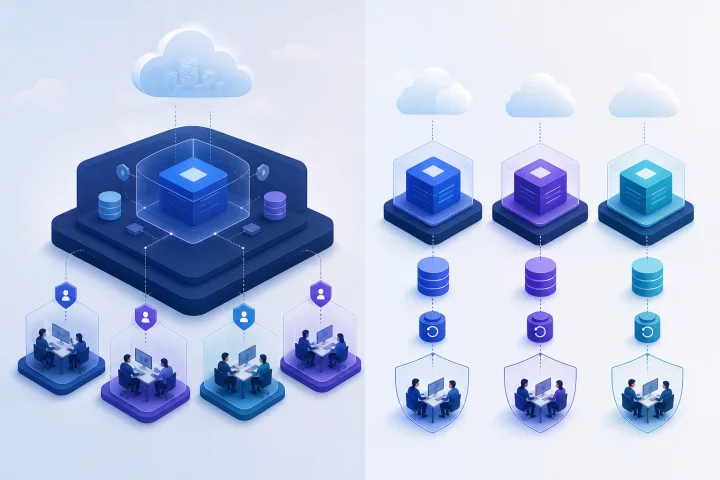
A workspace, a role, and a deployment solve different problems
The question is not simply whether people should see different folders, projects, or records. It is which boundary must be enforced, who is trusted to operate on each side of it, and how independently each group must change and recover.
An in-application role typically governs what an authenticated user can do. A workspace, organization, project, or similar logical container may organize records and limit which users can view or edit them. These controls can be effective when the application implements them well and they are configured, reviewed, and tested. They are still controls inside one application deployment.
A separate deployment is an infrastructure and operations boundary. In a container-based setup, a [Docker Compose project](https://docs.docker.com/compose/intro/compose-application-model/) groups a deployment’s resources and can isolate them from other installations that use different parameters. A separate project may also have its own default network. That does not make it an entirely independent host or eliminate the importance of host administration, but it is materially different from creating another workspace in the same application.
Do not use a workspace name as shorthand for a security architecture. First establish what the application actually isolates; then decide whether that isolation matches the promise made to a team, client, legal entity, or regulator.
- User-role boundary: which signed-in users can perform which actions.
- Logical data boundary: which records, projects, or workspaces users can access within one application.
- Deployment boundary: which application services, configuration, persistent data, credentials, routes, and release schedule belong together.
- Host-administrator boundary: who can administer the server, container runtime, storage, and deployment configuration.
- Recovery boundary: what data can be restored independently, by whom, and with what effect on other users.

Start by naming the real boundary
A team is not always the unit that needs separation. The relevant boundary may be a client organization, a legal entity, a business unit with separate administrators, a production environment, or a category of data with special handling requirements. A useful design begins with a plain-language statement of what must not cross the boundary.
For example: “Client A’s staff must not access Client B’s records” is primarily an application-access requirement. “Client A must have a separately restorable data set, separately owned integrations, and no reliance on Client B’s release approval” calls for a stronger operational boundary. “An external client must not need to trust our internal administrators with access to its service configuration and stored data” raises a hosting and administrative trust question, not merely a role-design question.
Where personal data is involved, governance should cover both prevention and recovery. [GDPR Article 5](https://eur-lex.europa.eu/eli/reg/2016/679/oj?locale=EN) calls for appropriate technical or organisational measures that protect against unauthorized or unlawful processing and accidental loss, destruction, or damage. It also includes storage limitation: identifiable personal data should not be retained longer than necessary for its purpose, subject to stated exceptions. Different retention or deletion duties are often a practical reason to avoid a single undifferentiated data estate.
- Identify the protected population: internal staff, one client, a legal entity, a regulated function, or a production environment.
- State the consequence of an access mistake: inconvenience, contractual breach, exposure of confidential information, or regulatory impact.
- List people who need elevated access: application administrators, integration owners, infrastructure administrators, and support personnel.
- Record whether data must be exported, retained, deleted, or restored on a different timetable for each group.
- Write down whether the boundary is a preference for organization or a contractual, legal, or security requirement.

When separate instances are usually the safer operational choice
Separate instances are usually the safer choice when the groups have independently governed data, different trusted administrators, incompatible integration credentials, or distinct lifecycle and recovery requirements. Agencies commonly encounter this when each client expects its own users, domain, connected services, data exports, offboarding process, and approval path for change.
Separate instances can reduce the blast radius of a mistaken configuration change or restore because each instance can have its own application configuration and persistent-data scope. They also make ownership easier to explain: this domain, route, instance, credential set, backup scope, and runbook belong to this organization. The benefit is not that containers make every risk disappear. It is that operational controls can align more closely with the real organizational boundary.
[Docker advises](https://docs.docker.com/engine/security/) that only trusted users should control the Docker daemon, because its capabilities can permit mounting host directories into containers without limiting the container’s access rights. Accordingly, separate applications on a shared host do not remove the need to govern infrastructure-administrator access. [Docker Rootless mode](https://docs.docker.com/engine/security/rootless/) can reduce exposure by running the daemon and containers as a non-root user, but it is a host-hardening measure, not a substitute for independent administrative domains.
- Separate by organization when a client needs independent ownership, offboarding, or recovery decisions.
- Separate when one group’s administrator should not administer another group’s application configuration.
- Separate when credentials, webhooks, API keys, or external accounts must be owned and rotated independently.
- Separate when release timing, custom configuration, retention, or change approval differs materially.
- Escalate beyond separate instances on one host when the required boundary includes independent infrastructure-administrator trust or stronger contractual isolation.
Assess five decision factors before choosing the model
Use the following factors as a practical test. Give each factor a rating for every proposed group: low, medium, or high need for independence. A single high-risk requirement may outweigh several convenience benefits of a shared model.
The key is to assess demonstrated controls, not labels. If the application says it has organizations or workspaces, test the exact actions that matter: viewing records, searching, exporting, inviting users, changing permissions, administering integrations, and deleting data. If a requirement cannot be shown in a test environment or supported by the application’s documentation, treat it as unmet until proven otherwise.
- 1. Data visibility: Can users, administrators, and support staff see only the records they are authorized to handle? Test direct navigation, search, reports, notifications, exports, and bulk actions—not only the normal user interface.
- 2. Administrator access: Who can change roles, configuration, storage, logs, and deployment settings? Separate application roles from access to the Docker host, runtime, and persistent storage. Apply separation of duties and least privilege where practical.
- 3. Integrations and secrets: Does each group need its own API keys, mail account, webhook destination, identity configuration, or external data connection? [Docker Compose can grant a secret](https://docs.docker.com/compose/how-tos/use-secrets/) only to services that explicitly declare it, and mounts it as a file. Avoid treating environment variables as a harmless secret store; Docker warns that passwords and API keys there may be exposed unintentionally, including through debugging logs.
- 4. Lifecycle independence: Can each organization accept the same upgrade window, configuration baseline, support process, and change-approval path? If not, shared tenancy creates coordination debt.
- 5. Backup and restore boundaries: Can one group be restored without rolling back, exposing, or disrupting another? The important question is whether the planned restore procedure proves the boundary you need.
Map the application’s isolation model before relying on it
Every application has its own model, and generic terms are not enough. Before deciding that a shared instance is suitable, make an evidence-based map of its controls. Use the version and documentation relevant to your planned deployment, then validate important assumptions with test accounts.
Start with ordinary user behavior, then work outward. What defines membership? Can a person belong to more than one workspace? Are roles scoped globally or to a workspace? Can users discover records through search, links, reports, notifications, or exports outside their expected scope? Are audit, administration, and integration screens available to a wider class of users than operational screens?
Next, map the data path. Identify the database or persistent store, uploaded files, application logs, exports, email or webhook destinations, and backups. A separate front-end container is not an independent recovery boundary if two organizations still use the same data store or backup artifact. [Docker’s volume guidance](https://docs.docker.com/engine/storage/volumes/) includes procedures to archive and restore named volumes, which reinforces a basic planning rule: persistent data and a tested restore procedure must be part of the boundary design.
- Document global roles and scoped roles separately.
- Test membership removal, user deactivation, invitation flows, and administrator handover.
- Test record visibility through normal screens, search, APIs where applicable, generated reports, notifications, and exports.
- Identify where attachments, logs, exports, and persistent data reside.
- Document who can access application configuration, deployment manifests, host storage, backups, and secret material.
- Keep test evidence with the decision record, especially for client commitments or sensitive data.
Compare three practical deployment patterns
Pattern one is one shared application instance. It is operationally economical and can work well for a single organization or a closely governed set of internal teams. It relies heavily on the application’s authorization model and on careful management of global administrators, shared configuration, integrations, and recovery procedures.
Pattern two is one application instance per organization. Each organization receives its own deployment configuration, persistent-data scope, hostname or routing rule, application administration, and operational record. This typically provides a clearer basis for separate credentials, release decisions, exports, retention actions, and restores. It introduces repeated operational work that must be planned rather than improvised.
Pattern three is shared infrastructure services with separated application instances. For example, [separate Compose projects can use](https://docs.docker.com/compose/how-tos/networking/) their own project-specific networks for internal components such as an application and database, while deliberately connecting to an externally created shared network where communication with a shared edge or support service is required. This can balance consistency with bounded application connectivity, but network membership and routes must be explicitly designed and reviewed.
- One shared instance: best when governance, administration, lifecycle, and recovery are genuinely shared.
- One instance per organization: best when ownership and operational decisions must be independent.
- Shared services with separate application instances: best when an organization can safely centralize selected platform functions while keeping application and data-tier boundaries distinct.
- For every pattern, decide explicitly whether host administration is shared, restricted, or requires a stronger separation model.
Plan for the operational work that multiplies with each instance
Separate instances reduce some governance coupling, but they increase operational inventory. Every instance needs a known owner, an access model, a domain or routing rule, application configuration, credentials, backup scope, monitoring expectations, upgrade history, and an incident-response path. An agency that creates instances quickly but cannot identify their owner or restore procedure has created avoidable risk.
Domain and TLS management are part of this work. [Traefik’s dynamic configuration](https://doc.traefik.io/traefik/reference/routing-configuration/dynamic-configuration-methods/) determines how incoming requests are routed to services, and that configuration can be delivered by mechanisms including Docker labels and files. Each instance therefore needs an accurate, maintained mapping from hostname or rule to its service. A [Traefik router configured for TLS](https://doc.traefik.io/traefik/v3.2/routing/routers/) handles HTTPS requests and terminates TLS before sending decrypted traffic to the configured service.
Certificate automation also has a lifecycle. [Let’s Encrypt applies issuance limits](https://letsencrypt.org/docs/rate-limits/) to requests through its new-order API endpoint. Use a controlled naming scheme, validate DNS before go-live, avoid repeatedly requesting certificates during ad hoc testing, and retain a clear procedure for domain changes.
Airbip runs application instances as Docker workloads on Airbip cloud servers and automates routing and TLS certificates through Traefik and Let’s Encrypt. It also provides DNS checks, service lifecycle management, configurable daily, weekly, and monthly backups, and a choice of an Airbip subdomain or compatible custom domain. These platform capabilities can reduce repetitive infrastructure work, but customers still need to define ownership, access, data handling, backup scope, restore procedures, and the appropriate separation model.
- Maintain an instance register: organization, owner, purpose, domain, administrators, connected services, data classification, and offboarding date if applicable.
- Use a predictable domain convention and verify routing ownership before launch.
- Track application releases, configuration changes, and approval requirements per instance.
- Define monitoring and incident contacts for every instance; do not assume a central team knows the relevant client context.
- Schedule backup and restore testing at the scope promised to the organization.
- Plan migration work before adopting separate instances, including how data moves, how access is cut over, and how the original data is retained or deleted.
Frequently asked questions
Are workspaces enough to separate clients in a self-hosted application?
Sometimes, but only when the application’s documented and tested authorization model meets the required boundary. Test visibility, search, exports, administration, integrations, logs, and offboarding. Workspaces are logical controls inside an application; they are not automatically separate deployment, administrator, or recovery boundaries.
Does a separate Docker Compose project provide complete isolation?
No. A Compose project groups deployment resources and can create a project-specific default network, which is useful separation at the deployment level. It does not by itself create independent host-administrator trust. Docker advises restricting control of the Docker daemon to trusted users. Design host access, storage, shared networks, secrets, and backups deliberately.
What is the strongest reason to use one instance per client?
Independent governance is usually the strongest reason: separate administrators, integration credentials, retention or offboarding duties, change approvals, and restore requirements. Separate instances make these operational responsibilities easier to assign and evidence, provided their data stores, credentials, and backup procedures are also separated appropriately.
Can separate instances share infrastructure services?
Yes, where the trust model permits it. Docker documents that separate Compose projects can communicate through an externally created shared network, while retaining project-specific networks for internal components such as databases. Treat every shared service as an explicit design choice and review which instances can reach it and what data it can access.
How should backup requirements influence the decision?
Ask whether each organization needs an independently restorable data set, separate restoration priority, and a different recovery owner or objective. A backup is only useful if it can be restored successfully in the required scenario, so test the planned restore procedure at the scope required.
When should we choose SaaS or a centrally managed enterprise platform instead?
Consider another model when you need a level of tenancy, identity integration, compliance evidence, support coverage, contractual responsibility, or infrastructure separation that your team cannot reliably operate. A third party may process personal data on an organization’s behalf where the applicable relationship and safeguards are appropriate, but the organization must still assess the supplier, agreement, responsibilities, and data-governance fit.
Sources and further reading
- Docker Engine security — Docker
- Docker Compose application model — Docker
- Docker Compose networking — Docker
- Docker Compose secrets — Docker
- Docker volumes — Docker
- Docker Rootless mode — Docker
- Traefik routing configuration — Traefik Labs
- Traefik routers and TLS — Traefik Labs
- Let’s Encrypt rate limits — Internet Security Research Group
- General Data Protection Regulation — EUR-Lex, European Union