Can You Trust This Webhook? A Security Checklist for Self-Hosted Applications
Before connecting an external service to a self-hosted app, verify how its webhook endpoint authenticates requests, validates events, limits their effects and handles secrets and logs.
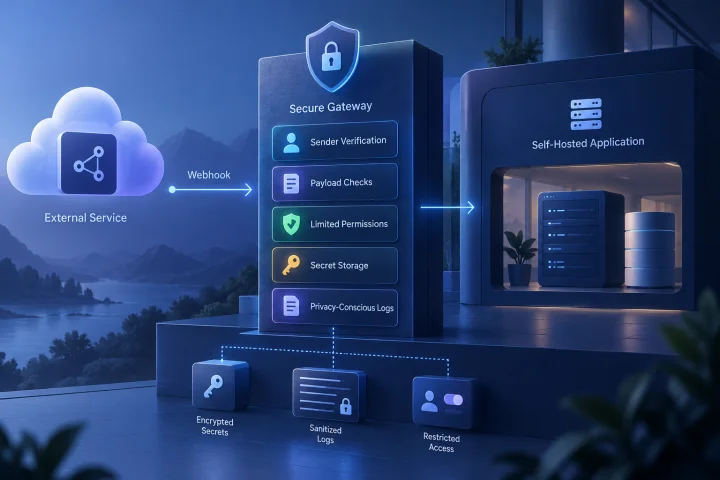
Start by mapping every inbound webhook
A webhook is an entry point into your application. Before enabling one, document what can send requests to it, what the endpoint accepts and what an accepted event can cause the application to do.
Keep the map specific to each integration. A single application may have several endpoints with different senders, event types, payloads and consequences. Do not assume that securing one endpoint secures the others.
- Sender: which external service is expected to make the request, and how does it identify itself?
- Endpoint: record the exact URL, application instance and environment.
- Events: list the event types you intend to accept, not just the provider's full event catalogue.
- Data: note which fields arrive, including personal, financial or operationally sensitive information.
- Effects: trace each event to the changes, messages, API calls or other actions it can trigger.

Verify how the application authenticates the sender
Find the exact authentication method supported by the application and the external service. Check the documentation for the application version you run and for the integration you are configuring; a generic claim that an endpoint is protected is not enough to establish how it works.
Look for a documented signature check or another sender-verification mechanism, such as a secret sent in a defined request header. Confirm what is verified and how failures are handled. If the application offers no documented way to authenticate inbound requests, treat that as an unresolved risk rather than assuming that an obscure URL is a credential.
Keep transport protection and sender verification as separate checklist items. A configured route or TLS certificate does not, by itself, answer whether the application verifies that a request came from the intended sender.
- Can you identify the credential or signature method from the app and provider documentation?
- Does verification cover the request body or otherwise bind authentication to the event being processed?
- Does the endpoint reject a missing or invalid credential, rather than continuing with the request?
- Is the documented mechanism available in your deployed version and enabled in your actual configuration?
- If verification is implemented by a proxy or integration layer rather than the app, who owns that configuration and how is the trust boundary enforced?

Validate the payload and narrow the event scope
Authentication and payload validation answer different questions. Even after a request passes the sender check, validate that its body has the expected structure, types, sizes and allowed values before acting on it.
Treat the event body as input, not as trusted instructions. Map accepted event types to explicit application actions. Reject unknown event types and unexpected fields where practical; do not let arbitrary text in a payload choose a privileged action or destination.
- Define required fields and acceptable formats for each event type.
- Set reasonable limits for request size and reject malformed or incomplete bodies.
- Check that identifiers and referenced records belong to the expected account, workspace or tenant.
- Allow only the event types the integration needs; review scope when adding a new one.
- Separate parsing and validation from the code or configuration that performs consequential actions.
Ask how stale and repeated requests are handled
A captured or repeated request may be presented again. Check whether the sender's documented mechanism includes a timestamp, event identifier or other replay protection, and whether the receiver validates it. Do not assume that a valid signature alone makes every copy of a request safe to process.
Decide how duplicate events should be recognized and what the application does when the same event arrives more than once. The required behavior depends on the integration, but it should be intentional and testable.
- If timestamps are used, confirm that the receiver checks them against a documented acceptance window.
- If event identifiers are provided, determine whether processed identifiers are recorded and for how long.
- Check how clock differences, delayed delivery and repeated requests affect acceptance.
- Trace whether processing the same event twice could create duplicate records, messages or other unwanted effects.
- If the app does not provide these checks, establish whether the integration layer can implement them safely.
Limit what an accepted request can do
A correctly authenticated webhook can still have too much authority. Review the permissions of the account, token or automation used to carry out its actions, and give it only the access required for the intended event.
Keep the endpoint's purpose narrow. An event that updates one record should not also be able to invoke unrelated administrative operations simply because they are reachable from the same automation. Review the full path from request to action, including any connected services.
- Use a dedicated integration identity or credential when the application supports it.
- Grant only the permissions and data access the integration needs.
- Make each accepted event map to an explicit, limited action.
- Consider what damage could follow from a valid but unexpected event, compromised sender credential or application configuration error.
- Review whether the endpoint must be publicly reachable and which surrounding access restrictions are available in your deployment.
Protect webhook secrets through storage and rotation
Treat signing keys, shared secrets and related integration credentials as sensitive. Identify where each value is stored, which people and systems can read it, and whether it appears in configuration exports, support material or diagnostic output.
Plan rotation before an incident or scheduled change. Check the provider and application instructions for how to replace a secret, whether both sides can be updated in a coordinated window and how you will confirm that the new value works. Avoid leaving an old credential active indefinitely just because changing it needs coordination.
- Keep secrets out of source code, public documentation and ordinary support notes.
- Restrict access to the configuration and administrative accounts that can reveal or change credentials.
- Record which integration uses each secret so you can identify the impact of a rotation.
- Test the rotation procedure in a safe environment where possible, including the expected failure of the old credential.
- After rotation, check that the integration works and that obsolete credentials are no longer accepted.
Check logs and retention for sensitive data
Logs help administrators diagnose rejected requests and investigate unexpected activity, but request bodies and headers may contain personal data, business information or credentials. Review what the application and surrounding components record before relying on default logging behavior.
Prefer enough information to identify and investigate an event without copying its full sensitive payload into every log. Confirm who can view the logs, how long they are retained and whether exported or backed-up copies follow the same access rules.
- Check whether logs include request bodies, authorization headers, signatures, query strings or other secret-bearing values.
- Use event identifiers and outcome details where they provide useful diagnostics without exposing the full payload.
- Review access to application, proxy and integration logs separately.
- Set retention and deletion expectations for logs that may contain sensitive request data.
- Verify that error messages do not reveal secrets or unnecessary payload content to users or external callers.
Separate application checks from hosting and integration controls
Make an ownership table for each control. The application may authenticate a request and validate its event, while routing, TLS configuration, access restrictions, secret storage or additional checks may be handled elsewhere. The exact division depends on the application and deployment; verify it instead of assuming that one layer covers another.
Airbip's stated hosting capabilities include running application instances as Docker workloads on Airbip cloud servers and automating routing and TLS certificates through Traefik and Let's Encrypt. Those hosting capabilities do not establish that a particular application's webhook endpoint authenticates senders, rejects replays or limits event permissions. Confirm application-level behavior in the relevant app and integration documentation.
- For every control, name the component that enforces it: application, external provider, proxy, integration layer or administrator procedure.
- Confirm which layer rejects a request when a check fails; avoid relying on an assumption that a network route performs application-level validation.
- Document configuration ownership and who can change endpoint exposure, credentials and permitted actions.
- If you cannot verify a required control, record the gap and decide whether to add a suitable layer, choose a different integration method or avoid enabling the webhook.
Frequently asked questions
Does HTTPS make an inbound webhook trustworthy?
Treat transport protection and sender authentication as separate checks. Verify how the receiving application or integration confirms that a request is from the intended sender, and what it checks before accepting the event.
What should I do if the application does not document webhook signatures?
Do not assume the endpoint is authenticated. Check the documentation for your deployed version and integration, then determine whether a separate layer can enforce sender verification and payload checks. If you cannot establish a reliable control, reconsider exposing that endpoint.
How can I test a webhook without risking production data?
Use a non-production environment where possible, with test credentials and actions that cannot affect real users or records. Verify expected rejection of missing or invalid authentication, stale or repeated requests, malformed bodies and unsupported event types. Test secret rotation and confirm that logs do not expose credentials or unnecessary sensitive payload data.
Are webhook secrets and event payloads safe to put in logs?
Do not assume so. Inspect what the application and surrounding services record, restrict access to logs and avoid retaining secret-bearing headers or full sensitive payloads unless there is a clear, controlled need.
Sources and further reading
- Docker documentation — Docker
- Traefik documentation — Traefik Labs
- Let’s Encrypt documentation — Internet Security Research Group
- NIST Cybersecurity Framework — NIST
- OWASP Application Security Verification Standard — OWASP