Can Your Self-Hosted AI App Handle Concurrent Requests? An Overload-Test Checklist
Test how your self-hosted LLM app handles simultaneous requests, queues, timeouts, cancellations and traffic bursts—then turn the results into safeguards users can understand.
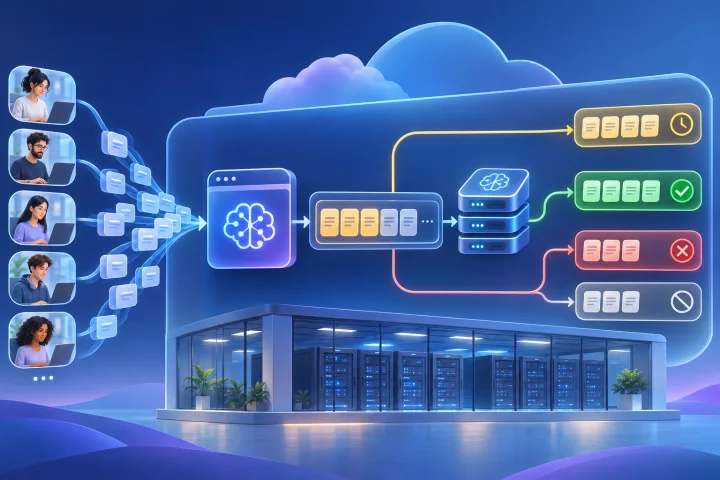
Test the request experience, not an imagined capacity number
A concurrency test should answer an operational question: what happens to a real user’s request when other work is already in progress? It should reveal where requests wait, how long clients keep waiting, what happens when a caller gives up, and whether the service recovers after a brief surge.
A single test does not establish a permanent capacity guarantee. Results depend on the application, inference server, model, request mix, deployment and conditions during the test. Use testing to find observable limits and failure modes, then repeat it when material parts of the system change.

Define what you mean by a concurrent request
A user action and an inference request are not always the same unit. One submission might trigger one call to the model, or an application workflow might make several calls before showing a result. Identify what your test client is submitting and what the inference endpoint receives.
Then choose a load model that matches the question. Simulated concurrent users help explore how a group of people using the app behaves. A target request-arrival rate helps test how the service responds when new requests arrive at a chosen pace, independently of how quickly earlier requests finish. These are different tests; do not treat a user count as a request rate.
- Record the path under test: client, application, any proxy or gateway, and inference endpoint.
- Decide whether each test iteration represents a user action, an application workflow or a single inference call.
- Use representative request content, including the kinds of prompt and response lengths your application handles.
- If testing by arrival rate, check that the load generator can sustain that rate; in an open-model test, longer iterations require more virtual users to keep the configured rate going.

Map the request journey and define expected behavior
Trace a request from submission to outcome. Depending on your deployment, it may wait in the application, a proxy, an inference scheduler or more than one queue before generation begins. Measure or inspect these stages separately where possible; an overall slow response does not tell you by itself where the delay occurred.
Before adding load, write down what a user should see in each situation. A request that is waiting should not look identical to one that has failed, and a user who cancels should not be left guessing whether the response is still coming.
- Waiting: Is the request visibly pending, and does the user know what to do while it waits?
- Timeout: Which layer stops waiting first, and what message or status does the user receive? Check whether work may continue after the client has timed out.
- Cancellation: Does cancelling the browser or application request also stop work at the inference endpoint, or only stop delivery of the response? Verify the behavior rather than assuming it.
- Overload: Does the system delay requests, reject them clearly, or fail in some other way? Can the client distinguish overload from an ordinary application error?
- Recovery: After the burst ends, do new requests complete normally, and do waiting or failed requests leave the system in the expected state?
Use a small, repeatable test matrix
Start with a smoke test to confirm that the route works and responses are valid. Then add scenarios that represent ordinary use, simultaneous submissions and short bursts. If you need to find where behavior changes, increase the load progressively; a longer-duration test can help reveal issues that do not appear in a brief run.
Keep the test environment and request mix as realistic as is practical. Capacity and overload behavior can depend on which resource is exhausted, so a test in a substantially different environment may not reproduce the same failure mode. Avoid exposing real sensitive user data in test prompts.
A practical concurrency test matrix
Use these scenarios to cover distinct traffic patterns. Record the same user-facing outcomes and service signals for each run.
| Scenario | Load model | What to observe |
|---|---|---|
| Smoke test | A small number of requests to confirm the route and response checks work | Correct response, status and basic completion behavior |
| Typical use | Concurrent users or an arrival pattern resembling ordinary use | Waiting time, completion, failures and user-visible delays |
| Simultaneous submissions | Several requests submitted together | Queueing, ordering, timeouts and whether responses reach the right callers |
| Brief traffic burst | A rapid increase in arrivals followed by a return to the usual pattern | Overload response, queue behavior and recovery after the burst |
| Progressive increase or longer run | Gradually increase load, or sustain a representative pattern for longer | Where behavior degrades and whether sustained operation differs from a short test |
Measure both correctness and waiting
A fast response is not useful if it is the wrong response or arrives with an error. Define checks for successful status, expected response structure and relevant returned data, alongside performance criteria that reflect your own reliability goals. A load-testing tool can report checks and pass/fail thresholds, but the team must decide what constitutes an acceptable result.
Separate time spent waiting to start from time spent generating where your stack exposes those measurements. For a vLLM deployment, available signals include running and waiting requests, queue time, end-to-end latency, request success and admission rejections. Metric names and availability depend on the serving stack; do not assume these vLLM signals exist in other systems.
- Track offered requests alongside completed, failed, timed-out and rejected requests so that incomplete work is not mistaken for successful handling.
- Watch queue depth and queue wait over the whole test, not just a single summary value.
- Check whether response latency and failure rates return to their usual behavior after the burst.
- Keep the request mix and test conditions with the results so later runs can be compared meaningfully.
Test cancellation, retries and duplicate submissions
Cancel a request while it is waiting and while it is being processed, then check what each layer reports. The browser may stop waiting even if the inference service continues working. That distinction matters during overload: work that no longer has a waiting user can still consume resources if cancellation does not propagate.
Test what happens when a client times out and submits again, or when a user clicks the submit control more than once. Establish whether these actions create multiple pieces of work and whether users can identify which response belongs to which submission. Do not assume a client timeout cancels server-side work.
Retries can add pressure precisely when a service is already struggling. If retries are appropriate for your application, avoid immediate synchronized retry behavior; exponential backoff with jitter is a common way to spread retry attempts. Make the retry policy visible in your test plan and confirm that it does not turn a short overload into a larger one.
- Cancel a waiting request and verify its eventual status.
- Cancel an in-progress request and check whether inference work continues.
- Allow a client deadline to expire, then inspect whether the original request is still active before retrying.
- Submit duplicates intentionally and check whether they create duplicate work or confusing results.
Choose safeguards users can understand
Long queues can increase latency and consume resources. Decide what should happen when the service is overloaded rather than allowing requests to wait without a clear bound or user expectation. Depending on the design, safeguards may include limits on accepted work, a clear overload response, client-side timeouts and controlled retry behavior. Verify each safeguard across the full request path.
A rejection is not automatically a bad outcome. A timely, understandable message can be preferable to accepting work that waits so long it becomes useless. Tell users whether they should wait, retry later or contact an administrator, and make sure the guidance matches what the system actually does.
Document the limits you observed as operational guidance. For example, state which request pattern was tested, what users may see when the service is busy, and how operators will recognize that the system has recovered.
- Set a policy for how much work may wait and what happens when that policy is reached.
- Make waiting, failure, cancellation and overload distinguishable to users and operators.
- Keep retries bounded and avoid having every client retry at the same moment.
Record the result and retest after changes
Keep a short test record: the request path, load model, request mix, environment, checks, observed queue and failure behavior, cancellation and retry results, and recovery after the burst. Note which outcomes were acceptable and which need follow-up. This makes the next run a comparison rather than a fresh guess.
Retest after changes that could alter request handling, such as changes to the application, inference serving setup, routing or workload. If results show long queues, late failures or poor recovery, investigate the layer responsible before simply increasing the amount of accepted work. When the required behavior cannot be achieved with the current serving approach, evaluate a different deployment or serving design against the same test criteria.
Airbip provides managed deployment for a catalog of applications, with instances running as Docker workloads on Airbip cloud servers. It automates routing and TLS certificates and includes service lifecycle management and configurable backups. Those infrastructure capabilities do not, by themselves, establish an inference endpoint’s concurrency limits or remove the need to test request behavior, application settings and data governance.
Frequently asked questions
What is the difference between concurrent users and requests per second?
Concurrent users model people using the application at the same time. Requests per second models the rate at which requests arrive. Because response duration affects how many users or load-generator workers are needed, the two approaches answer different questions.
Should a busy inference endpoint queue requests or reject them?
Choose based on the experience and protection your system needs. A queue can make work wait longer and consume resources; rejecting work when overloaded can protect the service, provided the response is clear and clients do not create more load through uncontrolled retries.
Does cancelling a request stop model inference?
Not necessarily. The client may stop waiting while work continues in the application or inference service. Test cancellation at different stages and confirm what each layer does.
Can one concurrency test establish a safe capacity?
No. Use repeatable tests to identify limits and failure modes, and rerun them after material changes.
Sources and further reading 4
- API load testing Grafana Labs
- Constant arrival rate Grafana Labs
- Production Metrics vLLM
- Addressing Cascading Failures Google SRE