Will This Self-Hosted Application Work Behind a Reverse Proxy? A Compatibility Checklist
A Docker application being reachable on a port does not prove it will behave correctly on a public HTTPS domain. Use this evidence-based checklist to verify canonical URLs, forwarded headers, cookies, uploads, real-time connections, and callbacks before launch.
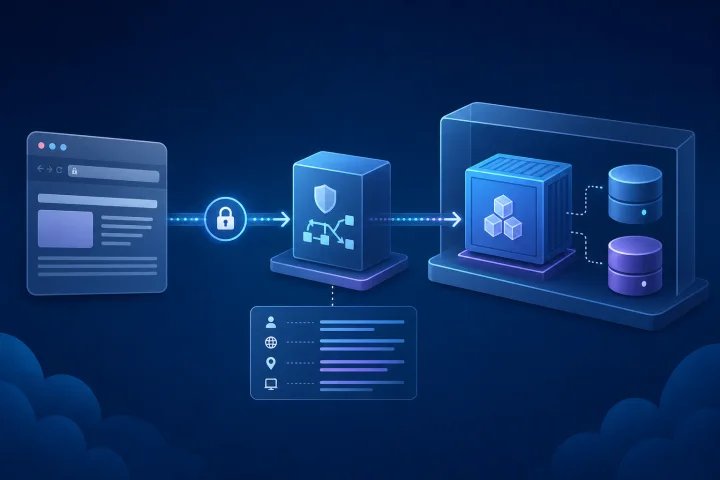
Why reverse-proxy compatibility is an application-selection concern
A reverse proxy sits between a visitor and an application. It can route a public domain to an internal service and terminate TLS, so the application does not necessarily need to listen directly on the internet. That infrastructure pattern is common, but it is not a guarantee that every self-hosted application will operate correctly behind it.
The important question is not simply whether the container starts or whether its internal port answers a request. The application must understand the public address users see, the original HTTPS scheme, and—where relevant—the originating client address. It must also work with the proxy’s limits and connection behaviour for the features your team intends to use.
Treat reverse-proxy compatibility as a selection and acceptance criterion. Before committing to an application, find its official deployment documentation and look for explicit guidance on external URL settings, reverse proxies, trusted proxies, forwarded headers, uploads, real-time connections, and external authentication. Where the documentation is silent, record that uncertainty and test the exact workflow you need.
- Do not equate “runs in Docker” with “ready for a public HTTPS domain.”
- Prefer an application with documented configuration for its external or canonical URL.
- Require evidence from a test deployment, not a successful container health check alone.
- Use only the public domain and normal user paths for acceptance testing; a direct internal port can hide proxy-related faults.

Map the request path before changing settings
Write down the full path a normal request takes: browser, public DNS name, reverse proxy, application, and any supporting services such as a database, mail service, identity provider, object storage service, or webhook destination. This turns a vague proxy problem into a set of boundaries that can be checked.
The proxy receives the public request and sends an upstream request to the application. In that process, the application may no longer see the original connection details unless it is designed to use proxy-provided request headers. Traefik, for example, automatically adds X-Forwarded-For, X-Real-Ip, X-Forwarded-Host, X-Forwarded-Port, X-Forwarded-Proto, and X-Forwarded-Server when proxying requests.
Also document which ports are intentionally public. Docker states that container ports are not externally reachable by default; publishing a port makes it available outside the host. When the upstream application and proxy share a host, publishing only to localhost can restrict access to the Docker host rather than exposing the upstream service remotely.
- Public hostname or hostnames, including any alternate domain.
- Expected external scheme: normally HTTPS for a public deployment.
- Proxy entry points for HTTP and HTTPS.
- Internal upstream hostname and port.
- The location of the TLS boundary.
- Any additional proxy, load balancer, CDN, VPN, or tunnel in front of the reverse proxy.
- Which upstream ports must remain private, and which must be publicly reachable.

Check 1: Configure and prove the canonical external URL
Many applications need an explicit setting for the address at which users reach them. Official documentation may call it a base URL, site URL, public URL, external URL, server URL, root URL, or similar. Set it to the final public HTTPS address, including any required path prefix, rather than an internal container name, private IP address, or HTTP URL.
This setting commonly influences links in the interface, links sent by email, password-reset destinations, webhook payloads, and OAuth callback construction. A seemingly minor mismatch can produce redirects to an internal hostname, HTTP links from an HTTPS site, or a login flow that returns to the wrong location.
Use the final hostname before testing integrations. Changing a public URL later can require changes in the application, identity provider, webhook providers, and bookmarks. If the official documentation does not explain the setting or whether a subpath is supported, do not assume it is safe to deploy beneath a path such as example.com/app.
- Set the documented canonical URL to the exact public HTTPS URL.
- Open pages from a clean browser session and inspect redirects.
- Send a password-reset or invitation email, if the application supports it, and verify the link uses the public address.
- Create a share link or public resource, where applicable, and open it from a separate session.
- Test both the bare hostname and any intended alternate hostname, then choose one canonical address.
Check 2: Establish the trusted-proxy and forwarded-header boundary
A reverse proxy needs a way to convey information about the request it received. RFC 7239 defines the standardized Forwarded header for information changed or lost through proxies, including source address, host, and protocol. In practice, applications may also use X-Forwarded-* headers. The application’s own documentation should tell you which headers it reads and how to declare trusted proxies.
Trust is the critical part. A client must not be able to supply a header that the application treats as authoritative client identity, host, or scheme. RFC 7239 notes that conclusions based on forwarded data depend on trusting the proxies that added it. Traefik can be configured to trust forwarded-header data only from specified IP addresses or CIDRs; its documentation advises against an always-trust mode in production.
Record the proxy address range or network boundary the application is configured to trust, if the application has such a setting. If there is more than one proxy layer, determine which layer strips, overwrites, or preserves forwarded headers. This is a security decision, not merely a routing convenience.
- Find the application’s official reverse-proxy or trusted-proxy documentation.
- Identify whether it uses Forwarded, X-Forwarded-Proto, X-Forwarded-Host, X-Forwarded-For, or other headers.
- Limit header trust to the known proxy boundary wherever the relevant component supports it.
- Avoid exposing the upstream application directly alongside the proxy unless there is a specific, controlled need.
- Test a normal public request and confirm the application reports the intended external scheme and host.
Check 4: Verify client IP addresses and audit events
Client address handling matters when an application shows login history, writes audit events, applies IP-based access controls, throttles requests, or makes security decisions from a source address. Behind a proxy, the immediate peer visible to the application may be the proxy rather than the person’s browser.
Create a controlled test with at least two distinct client networks where practical. Perform an action that should be recorded, then examine the application’s audit view or logs according to its documented behaviour. The goal is not necessarily to expose raw IP addresses to every administrator; it is to ensure the application’s recorded context and any IP-based controls behave as your policy expects.
If the application does not document proxy-aware client-address handling, avoid assuming its activity records identify the originating user’s network. Keep that limitation in the compatibility record and assess whether it affects your security, compliance, or support requirements.
- Identify features that rely on client address information.
- Verify whether audit records show the proxy address or the expected client context.
- Test any documented IP allowlist, blocklist, rate-limit, or suspicious-login feature through the public route.
- Confirm that only trusted proxy-supplied forwarding information is accepted.
- Decide who may access audit information and how long it should be retained.
Check 5: Test uploads, request limits, and long-running requests
Large uploads and slow requests cross more than one boundary. The application can impose its own size limit, while the proxy can impose another. With Traefik’s buffering middleware, a request larger than maxRequestBodyBytes is not forwarded to the service and receives HTTP 413. A zero value means unlimited, but unlimited is not automatically the right operational choice.
Buffering changes behaviour as well as limits. Traefik documents that, when its buffering middleware is attached, it reads the entire request body before forwarding it and may buffer large bodies to disk according to the configured threshold. Evaluate this against the type and size of files your users actually need to submit, rather than using a tiny sample file as the only test.
Long-running operations need their own evidence. Test the user-visible workflow at an expected duration and watch for failures at the browser, proxy, and application layer. A successful small upload does not prove that a sizeable import, export, or other extended request will work reliably.
- Define the largest normal file or request for the service, plus a slightly larger rejection case.
- Test a file close to the intended accepted limit through the public domain.
- Confirm where an oversized request is rejected: proxy or application, and whether the message is understandable.
- Review disk implications if request bodies can be buffered to disk.
- Test an expected long-running user action end to end.
- Record the configured and observed limits together so future changes do not create accidental regressions.
Check 6: Verify real-time and streaming requirements end to end
Do not assume that every application uses WebSockets, Server-Sent Events, streaming responses, or long polling in the same way. First identify the actual feature that needs a persistent or streaming connection: live notifications, collaborative editing, terminal access, dashboard updates, chat, or a generated response. Then test that feature through the final public domain.
Traefik documents WebSocket and secure WebSocket support through normal HTTP routing, including automatic handling of the upgrade and preservation of WebSocket headers such as Origin, Sec-WebSocket-Key, and Sec-WebSocket-Version. That capability is useful, but it does not remove the need to test the application’s own origin checks, authentication, session handling, and reconnect behaviour.
For streaming and event-driven functions that do not use WebSockets, consult both the application and proxy documentation for the relevant connection behaviour. Test with the same browser, hostname, HTTPS configuration, and user permissions that production users will have.
- Identify the specific real-time feature your team requires.
- Test it after signing in through the public HTTPS hostname.
- Keep the feature active long enough to observe normal reconnect or refresh behaviour.
- Test with more than one browser session if the feature involves shared updates.
- Check that browser errors, application logs, and proxy logs point to the same request path when a failure occurs.
- Do not label a feature compatible until its actual user workflow has passed.
Frequently asked questions
Can every Docker application run behind a reverse proxy?
No. Docker port publishing can make a container reachable, but the application must also correctly handle its public URL, HTTPS scheme, forwarded request details, sessions, and any required uploads, callbacks, or real-time connections. Verify these behaviours from official application documentation and a public-path test deployment.
Why does an application redirect to HTTP or an internal hostname behind a proxy?
This commonly indicates that its canonical external URL is missing or incorrect, or that it is not correctly using trusted proxy information about the original host and HTTPS scheme. Set the documented public URL, configure trusted-proxy behaviour where the application supports it, and retest through the final public domain.
What forwarded headers should I check?
Check the headers documented by the application. Traefik automatically adds X-Forwarded-For, X-Real-Ip, X-Forwarded-Host, X-Forwarded-Port, X-Forwarded-Proto, and X-Forwarded-Server when proxying. RFC 7239 also defines the standardized Forwarded header. Trust such information only from known proxy boundaries.
How should I test upload compatibility?
Upload a realistic file close to the intended production limit through the public HTTPS address, then test a larger file that should be rejected. Identify whether rejection occurs at the proxy or application layer. If Traefik buffering is used, review its maximum request-body setting and its buffering-to-disk behaviour.
Do WebSockets need a special proxy configuration?
The answer depends on the proxy and application. Traefik documents WebSocket support through normal HTTP routing with automatic upgrade handling. Still, test the exact application feature that needs real-time communication through the final domain, because authentication, origin validation, reconnect behaviour, and application requirements differ.
Why must OAuth redirect URLs be tested after the final domain is chosen?
OAuth 2.0 requires redirection endpoints to be absolute URIs, and authorization servers validate supplied redirect URIs against registered values. For authorization-code flows, the redirect_uri used at the token request must match the one used in the authorization request when it was included. Register and test the exact public HTTPS callback URL.
Sources and further reading
- Port publishing and mapping — Docker
- EntryPoints Documentation — Traefik Labs
- Headers Documentation — Traefik Labs
- Buffering Documentation — Traefik Labs
- WebSocket User Guide — Traefik Labs
- Challenge Types — Internet Security Research Group / Let’s Encrypt
- RFC 7239: Forwarded HTTP Extension — RFC Editor / IETF
- RFC 6749: The OAuth 2.0 Authorization Framework — RFC Editor / IETF