Headless or Traditional CMS? Choose by How Your Publishing Team Works
Compare a headless CMS with a traditional CMS by mapping your channels, testing editorial workflows, and assessing who will build and maintain the frontends.
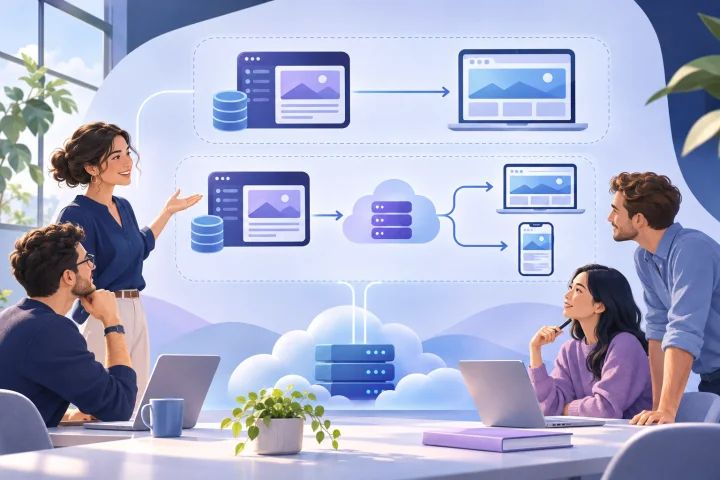
Start with the architecture, not the label
A traditional, or coupled, CMS connects content management with content delivery. The CMS typically renders the website using its own templates and display logic. A headless CMS separates content management from presentation and makes content available through APIs for frontends to consume.
That distinction describes how content reaches an audience; it does not by itself tell you which option is better. The decision depends on your channels, editorial process, frontend ownership, and ability to integrate and maintain the system.

Map every destination for your content
List where the same content needs to appear now, and where it may need to appear as part of a real, approved plan. A website-only publishing operation has a different delivery requirement from one serving a website, a mobile app, or digital displays.
For each destination, note who owns its frontend and how it will receive content. Headless delivery can serve multiple frontends through APIs, but that advantage matters only if the channels are real requirements and the team can operate the integrations.
- Name each destination: website, app, display, or another frontend your team actually supports.
- For each one, identify the owner, the content it needs, and how it is expected to receive updates.
- Separate confirmed needs from possible future ideas. Do not take on additional architecture work solely for hypothetical channels.

Test the editorial workflow in practice
Architecture is only useful if editors can complete the work they do every day. Test the candidate setup with the people who draft, review, approve, publish, and correct content. Do not judge preview by whether a button exists; check whether it shows the content as it will appear in the intended frontend.
Use one representative item and walk it through draft, review, scheduled publication if needed, publication, and correction. Check what each role can do, what reviewers can see, and how the team identifies or restores an earlier version if a change needs to be reversed.
A coupled CMS may connect editing and website presentation in one system. With a headless setup, the editorial experience and the final frontend are separate parts of the workflow, so verify that editors can preview the actual intended presentation without relying on assumptions.
- Can an editor save a draft and inspect a useful preview of the relevant frontend?
- Can the team route work to the right reviewer and distinguish work awaiting review from scheduled or published content?
- Can the correct people publish, while other contributors submit work for approval?
- Can editors inspect changes and recover from an unwanted correction?
- Can the team make a time-sensitive correction and verify the result on each destination?
Assess frontend ownership and integration capacity
A headless CMS separates the content service from presentation, but it does not eliminate presentation work. Each frontend still needs to be built and maintained. Before choosing this route, name the people or team responsible for those frontends and for the connections that deliver content to them.
Check whether the team can work with the candidate CMS’s APIs and handle the integration tasks its documentation describes. Include ongoing changes, troubleshooting, and frontend upkeep in the assessment—not just the initial build.
A traditional CMS connects management and website delivery more directly. That may better match a team that primarily needs a website and does not want to own separately developed frontends. Verify the candidate’s actual workflow and delivery options rather than assuming every product fits the same pattern.
- Who builds and maintains each frontend?
- Who owns API integration and investigates delivery issues?
- What work will editors need from developers, and how will requests be handled?
- Can the available team support this setup on an ongoing basis, not just during implementation?
Model content for the people and systems that use it
Content reuse is valuable when multiple destinations genuinely need the same information. Start by listing the fields and relationships each consumer requires, then check whether the proposed content model can serve those needs without forcing editors to maintain avoidable duplicates.
A headless approach can make structured content available to multiple frontends, but the model and integrations still need to fit the consumers. A website-oriented setup may be a better match when the content and presentation are closely tied to one site. Neither label guarantees that a particular product’s content model will suit your team.
- List the content types, fields, and relationships needed by each destination.
- Mark which content is shared and which presentation or information differs by channel.
- Test whether editors can maintain the model without unnecessary duplication or confusing workflows.
- Ask how model changes affect each consumer and who is responsible for updating integrations.
Verify claims before committing
Use official product documentation and a hands-on trial to verify the exact capabilities your workflow depends on. General descriptions of an architecture are not proof that a particular CMS supports your preview, approval, API, or export requirements in the way you need.
Write down the requirement, the evidence you found, and anything that remains uncertain. If documentation is unclear, test the behavior directly or ask the vendor to demonstrate it with your representative content.
- Preview: Does it show the intended frontend and current content changes?
- Workflow: Can the team draft, review, schedule, publish, and correct content as required?
- Permissions: Can responsibilities be separated so that editing and publishing rights match the team’s process?
- Integration: Does the documented API behavior support each intended consumer, and can your team operate the connection?
- Content portability: What export options are documented, what content do they include, and what would need to be checked or moved separately?
- Operations: Who handles frontend maintenance, access decisions, data governance, and recovery procedures?
Use the requirements to narrow the choice
Use this matrix to identify which architecture better matches your current requirements. Treat it as a starting point for evaluation, not a substitute for testing a specific CMS.
bullets
subsections
visuals
Architecture fit by requirement
A requirements-based comparison. The tendencies shown are not guarantees about any particular CMS.
| Requirement | Traditional or coupled CMS tends to fit when... | Headless CMS tends to fit when... |
|---|---|---|
| Content destinations | The main requirement is a website rendered by the CMS. | Content needs to reach multiple independently developed frontends. |
| Frontend ownership | The team wants content management and website delivery connected in one system. | The team can build and maintain each frontend separately. |
| Editorial preview | The team can verify the website preview in the CMS’s connected workflow. | The team can verify that preview represents the intended separate frontend. |
| Integration capacity | The required website workflow does not depend on integrations the team cannot support. | The team can assess and maintain API integrations for its intended consumers. |
| Content reuse | Content and presentation are primarily organized around one website. | Structured content needs to serve several actual consumers without avoidable duplication. |
Run a pilot before planning a migration
Choose a representative piece of content rather than an unusually simple demo. Include the fields, review steps, and destinations that make your real workflow demanding. Run the same editorial tasks in each candidate setup where possible, then record what editors and the people responsible for frontends had to do.
Review the pilot against the requirements you wrote down. A short-term convenience should not hide ongoing frontend or integration responsibilities, and a theoretical benefit should not outweigh an editorial workflow the team cannot use reliably.
- Select representative content and identify every intended destination.
- Draft it, preview it, route it for review, and schedule or publish it as your process requires.
- Make a correction, inspect the change, and test whether the team can verify the result on each frontend.
- Record integration work, maintenance ownership, workflow gaps, and unanswered export questions.
- Agree in advance how the team will decide whether the pilot meets its requirements before migrating content.
Frequently asked questions
Is a headless CMS better for publishing to multiple channels?
It can be a fit when the same structured content needs to reach multiple frontends through APIs. Confirm that those destinations are real requirements and that your team can build, integrate, and maintain each frontend.
Can editors preview content in a headless CMS?
Do not assume preview works the same way across systems. Test whether editors can see current changes in the intended frontend and whether that preview supports the team’s review process.
Does a traditional CMS only support a website?
The key distinction is that a traditional or coupled CMS connects content management with delivery, commonly rendering a website from its templates. Check the specific product’s documented delivery options rather than treating the architecture label as a complete feature list.
What should we test before migrating?
Use representative content and test drafting, preview, review, scheduled publication if needed, corrections, permissions, and delivery to each intended destination. Also verify API behavior and content export in the product’s documentation or a hands-on trial.
Sources and further reading 5
- CMS Publishing Explained for Enterprise Teams Pantheon
- WordPress Block Editor WordPress.org
- Post Status WordPress.org
- Revisions WordPress.org
- Roles and Capabilities WordPress.org